Fitness-Connected Meal Planning
Plan meals around your preferences and daily nutrition context
Quick answer
Budy brings nutrition targets, meal suggestions, and food logging into your fitness routine. Review portions, ingredients, and subscription access before relying on it.
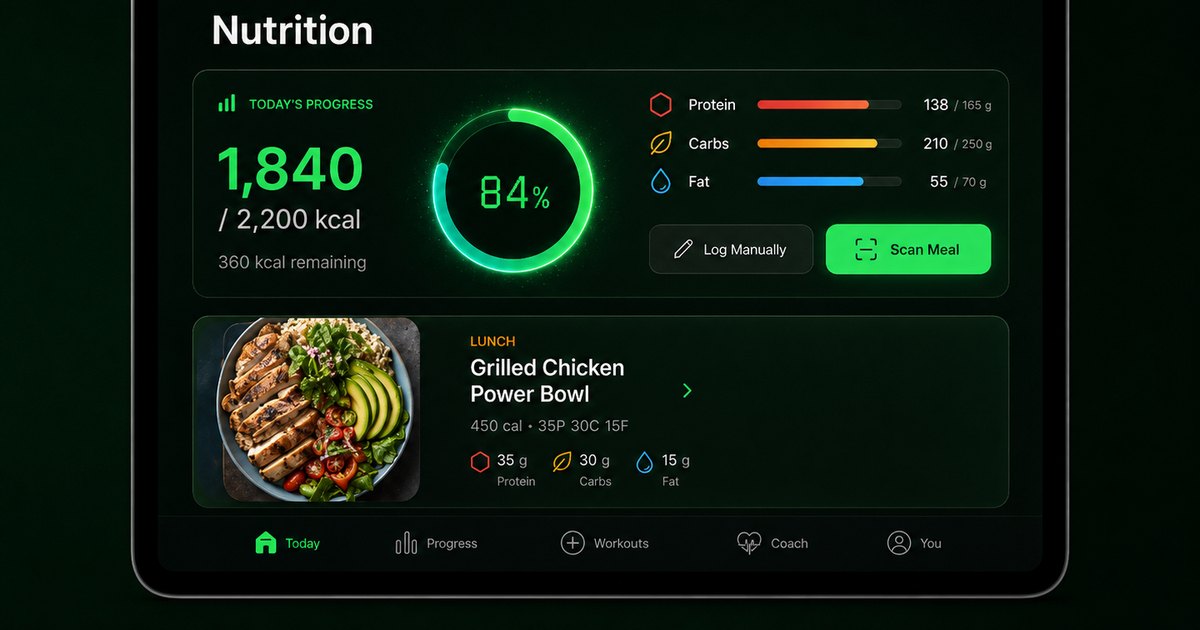
Choose the part of the workflow you need, then inspect the product and subscription details.
Set preferences before evaluating suggestions
Record your food preferences, meal timing, and ingredients you avoid. Inspect the ingredients and portions in each suggestion; filtering is not a guarantee of allergen safety.
For an initial estimate, explore the existing TDEE calculator and macro calculator. These tools estimate targets rather than prescribe medical nutrition.
Log what you ate and review what comes next
Use nutrition tracking and meal history to record actual intake. Review the available suggestions or swaps against your daily context. Photo-based estimates, where available, should be checked rather than treated as exact measurements.
For how this sits beside your training, use the workout and meal planner rather than treating a food plan as the whole program.
Choose the food features you need
The published tiers place nutrition tracking and meal suggestions in Advanced; Premium adds AI next-meal recommendations and meal photo analysis. See current inclusions and the official listing.
This page explains the mobile app workflow. It does not generate a personalized meal plan in your browser or provide clinical nutrition care.
Best fit and limits
Best for
- People willing to review app-generated suggestions against their circumstances
Not the right fit for
- Medical care, injury rehabilitation, or supervised exercise assessment
Frequently asked questions
Does this page generate meals without signing up?
No. It explains Budy’s in-app meal-planning workflow. The linked calculators provide general estimates, not a personalized meal plan.
Which tier includes nutrition?
The published tiers describe nutrition tracking and suggestions in Advanced, with additional AI food features in Premium. Check the offer in your installed app.
Are photo calories and portions exact?
No. Treat photo analysis and portion estimates as approximate, and use reliable ingredient or nutrition information when available.
Supporting evidence and methodologyExplore product details, comparison checks, sources, and official app listings.
Published by Budy. Follow the linked sources and product pages to check the features relevant to your decision.
Why Budy fits this need
Inspect the workflow, then confirm your device and subscription access.
Understand the workflow
Read the steps and inspect the relevant app previews.
Check the boundaries
Separate templates, product descriptions, and observed results.
Choose your next step
Compare access and compatibility before installing.
Who Budy helps here
For people evaluating the specific Budy workflow explained on this page.
- People evaluating training, nutrition, or coaching around their actual routine
Where this topic fits
AI Nutrition and Meal Planning
Pages about AI nutritionist features, meal planning, macro guidance, diet support, meal recommendations, recipe matching, and workout-connected nutrition.
Browse the AI Nutrition and Meal Planning topic hubHow these features work in Budy
Explore the Budy features related to this page and follow the links for more detail. Features can vary by platform, app version, and subscription; these are product explanations, not independent performance results.
Meal suggestions that fit your daily nutrition targets
Budy uses your nutrition progress and food preferences to suggest meals alongside your workout plan.
- Set nutrition targets, cuisine preferences, diet choices, meal timing, and ingredients you want to avoid.
- Review meal details, log what you ate, or choose a swap when a suggestion does not fit your day.
- Review portions and ingredient labels yourself. Preference settings and ingredient exclusions are not a guarantee of allergen safety.
Estimate meal nutrition from a photo
Budy can estimate calories and macros from a meal photo to reduce the amount of food information you enter manually.
- Take a photo of your meal and review the estimated calories, protein, carbohydrates, and fat.
- Treat the result as an estimate, not a measured portion or an exact ingredient list.
- Use manual logging when the photo estimate does not reflect your meal or you have more reliable nutrition information.
Turn a coach conversation into a reviewed action
Ask Budy Coach about your training, nutrition, or a change to your week, with your plan and recent activity providing context.
- Ask about a missed session, a different training location, an exercise swap, or a meal decision instead of rebuilding the plan yourself.
- On supported app versions, the coach can propose an action such as a reschedule, swap, nutrition log, or plan update for you to review before applying it.
- Check the resulting workout or meal after accepting an action. Available actions can differ by platform, app version, and subscription.
Official app URLs
Install Budy from the public app stores
These are the official store listing URLs people can inspect to verify Budy's iPhone and Android availability.
iOS app
App Store
Official iOS listing for Budy. Identifier: 6760213282. Last verified 2026-09-09.
Android app
Google Play
Official Android listing for Budy. Identifier: fit.budy. Last verified 2026-09-09.