

Zing Coach alternatives, ranked
The best Zing Coach alternatives for 2027
Quick answer
Looking for a Zing Coach alternative? Budy is our pick for 2027. It plans your training around the week you actually have and reworks the plan when that week changes, from $7.99 a month, and its Premium plan, at $9.99, adds an AI Coach and food tracking in the same app. If you only lift and want your weights chosen, pick Fitbod; for bodyweight training at home, Freeletics; for a free AI plan, Planfit; for a chat coach that edits your gym workouts, GymStreak; for a human coach, Caliber. Stay with Zing if its camera body scan and fitness tests are the reason you use it.



The 6 best Zing Coach alternatives for 2027
Ranked for people who use Zing Coach, or looked at it, and want something different: food and a coach beside the plan, weights chosen in the gym, bodyweight training at home, a free plan or a person. Budy publishes this guide and ranks its own app first; each other app is the better pick for one thing, and we say which.
Our pick · Best overall Zing Coach alternative
Budy
Plans your training around your week and reworks it when the week changes, with an AI Coach and your food in the same app on Premium.
From $7.99 a month. Free to download.
Best for gym strength training
Fitbod
Builds each strength session from your equipment and your log, with the sets, reps and weights to aim for.
$15.99 a month or $95.99 a year, after a 7-day free trial.
Best for bodyweight training at home
Freeletics
An AI Coach that builds bodyweight, weights and running Training Journeys and adjusts each session from your feedback.
Coach is paid for 3, 6 or 12 months upfront; US App Store items run from $34.99 to $79.99.
Best free AI workout plan
Planfit
AI workout plans, exercise guides and tracking for free, made for people who are new to the gym.
Free. Premium $11.99 a month or $79.99 a year.
Best chat coach for gym workouts
GymStreak
Spot, its AI coach, builds and edits your workouts by chat, answers from your logged sets and logs food by photo or voice.
Premium only; GymStreak shows your price in the app before you pay.
Best for a human coach
Caliber
A free lifting app, with a paid route to a real coach who writes your plan and reviews videos of your lifts.
Free app. Plus $12 a month or $72 a year. Coaching price on request.
| App | Best for | Starts at (US) | Who plans your training | A coach to ask | Food tracking |
|---|---|---|---|---|---|
| 1. Budy | Best overall Zing Coach alternative | $7.99 a month | AI, around your whole week | AI Coach, with Premium | Yes, with Premium |
| 2. Fitbod | Best for gym strength training | $15.99 a month | AI, each session from your log | Trainers, by email | No |
| 3. Freeletics | Best for bodyweight training at home | From $34.99 upfront | AI Coach, in Training Journeys | No; the Coach is not a chat | Separate app, in a bundle |
| 4. Planfit | Best free AI workout plan | Free; Premium $11.99 a month | AI, from your level and equipment | Not listed | Not listed |
| 5. GymStreak | Best chat coach for gym workouts | Shown in the app | AI, edited by chat | Yes, Spot, with Premium | Yes, by photo, text or voice |
| 6. Caliber | Best for a human coach | Free; Plus $12 a month | You, a ready plan or a coach | A human, with Premium Coaching | Targets with Plus |
US prices from each app’s own site or store listing in November 2026. Your store shows the price in your country before you pay.
Why Budy is our top pick
| Criterion | Why it matters | What Budy does | Where to verify |
|---|---|---|---|
| Your week is planned for you | A plan only helps if it fits the days and the equipment you really have. | Budy builds the plan from your goal, days, location, equipment, experience, limits and pace, with a goal date. | |
| The plan moves when your week does | Missed sessions and busy weeks break a fixed plan. | Take a 15-minute version, move a gym day home with swaps for your equipment, or let the plan rework the week after a missed session. | See the AI workout app that adapts. |
| A coach that changes the plan with you | Advice only helps if it becomes your next workout. | Premium’s AI Coach answers with your plan and recent training in mind and proposes changes you approve. | |
| Food in the same app | What you eat decides a lot of what training can do. | Premium adds calorie and macro targets, meal suggestions and meal photo analysis. | See the AI workout and meal planner. |
| A price you can see first | You should know the cost before you set anything up. | Advanced is $7.99 a month, Premium $9.99 and Pro $19.99 (US App Store prices). | Compare what each plan includes. |
The 6 Zing Coach alternatives in detail
1. Budy: best overall Zing Coach alternative
If you like that Zing hands you a workout each day, Budy keeps that and builds it around the week you actually have. Tell it your goal, the days you can train, where you train, your equipment, your experience, any limits and the pace you want, and it writes a plan with a goal date. Today’s session is ready when you open the app, at home, in a gym, outdoors or a mix of them.
When the week changes, the plan changes with it. Take the 15-minute version on a busy day, move a gym session home and Budy swaps each exercise for one that fits the equipment you have, or let the plan rework the rest of the week after a missed session. Every set shows a demo and last time’s numbers, on your phone, Apple Watch or Wear OS watch.
Premium adds the parts you would otherwise piece together: an AI Coach that knows your plan and your recent training and proposes changes you approve, voice-guided workouts, and nutrition with calorie and macro targets, meal suggestions and meal photo analysis. Zing sells its Nutrition Guide as a separate one-off purchase; in Budy, food sits beside your training. Advanced, with the plan, swaps and tracking, is $7.99 a month.
What it does best
- Plans your week and reworks it when you miss a day or change where you train
- AI Coach, nutrition and voice guidance in the same app on Premium
- Published prices, and apps for iPhone, iPad, Apple Watch, Android and Wear OS
Where it falls short
- No camera body scan or camera movement tracking of the kind Zing advertises
- No free plan: you can download and preview, but your plan needs Advanced
- The AI Coach, nutrition and voice guidance start at Premium, not Advanced
- Your Zing history does not import
Price: Free to download. Advanced $7.99 a month or $79.99 a year; Premium (adds AI Coach, nutrition and voice) $9.99 a month or $99.99 a year; Pro $19.99 a month or $199 a year.
Pick it if: you want one app to plan your training, fit it to your week and cover your food and your questions.
See it before you install
Real Budy screens. Select one to see it full size, or see the iPhone and Android pages.
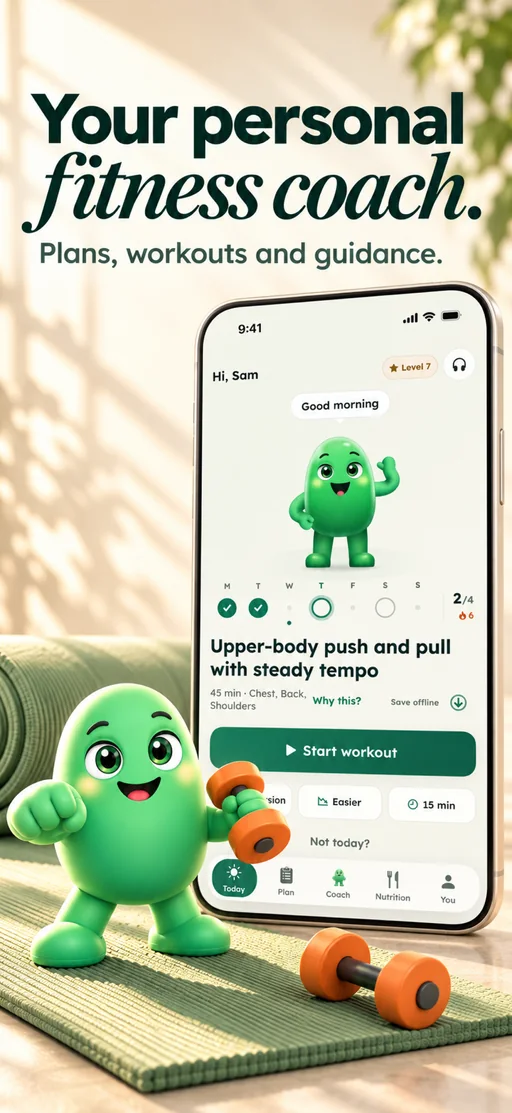
Today with your coach
Today’s session and your coach, one tap from Start.
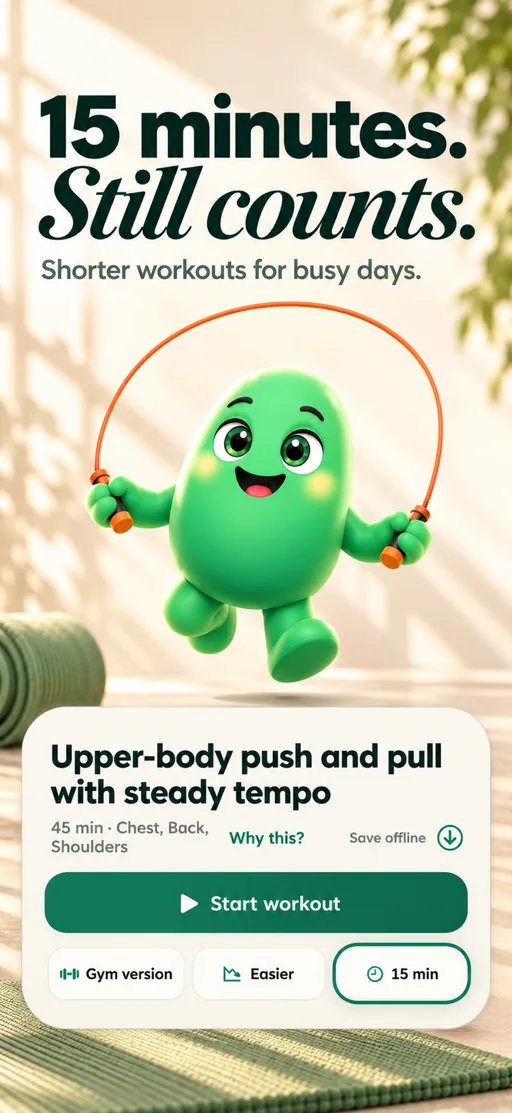
Short sessions
A busy day gets a 15-minute version, a gym version or an easier one.
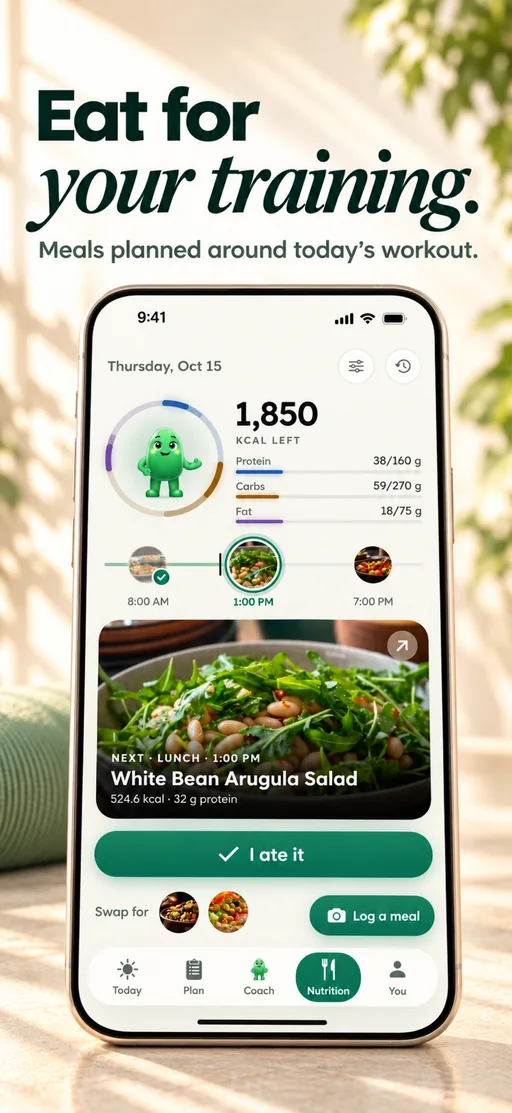
Nutrition
Calories, macros and your next meal beside your training.
What people say in their App Store reviews
“This feels much easier to fit around real life.”
Holt_Finchi · · App Store
“harder to convince myself that I’ll ‘just do it tomorrow.’”
trulajamisonm · · App Store
“challenging without feeling completely unrealistic.”
nestor_smallwoodv · · App Store
Selected excerpts from US App Store reviews and one UK review. Read the full reviews for context; individual experiences vary, and there is also an earlier complaint about equipment matching and scheduling.
2. Fitbod: best for gym strength training
If you joined Zing to lift and want more exact numbers, Fitbod is the specialist. It builds each workout from your goal, experience, equipment and training split and from the sessions you have logged, recommends the sets, reps and weight for every exercise from how your recent sessions went, and works around muscles that have not recovered yet.
It costs $15.99 a month or $95.99 a year after a 7-day trial, and once the trial ends you cannot log new workouts without a subscription. Fitbod’s App Store listing offers trainers who answer questions by email, and it lists no coach chat and no nutrition. Budy plans the whole week, adds a coach and food on Premium and costs less each month, which is why it ranks first.
What it does best
- Sets, reps and weights chosen from your own history
- A recovery estimate for each muscle group
- An Apple Watch app, and sync with Apple Health and Health Connect
Where it falls short
- No free tier once the 7-day trial ends
- No nutrition and no coach chat
Price: $15.99 a month or $95.99 a year, after a 7-day free trial.
Pick it if: strength training is your whole goal and you want the weight for every set chosen for you.
3. Freeletics: best for bodyweight training at home
If you train at home with little or no equipment, Freeletics is the specialist. Its AI Coach builds a Training Journey from bodyweight, weights, running or gym sessions, adjusts each workout from the feedback you give after a session, and lets you change your training days and equipment week by week.
Its help center is clear that the Coach is not a person and not a chat you can talk to. You pay for the whole period upfront, for 3, 6 or 12 months, with a 14-day money-back guarantee on your first purchase. The free version has a small set of bodyweight workouts, and nutrition is a separate Freeletics app sold in a bundle.
What it does best
- Hard, structured bodyweight training you can do anywhere
- Sessions that adjust from your feedback
- A free version to try first
Where it falls short
- No chat with the coach
- Paid upfront for months at a time
Price: The Training Coach is paid upfront for 3, 6 or 12 months; its US App Store purchases run from $34.99 to $79.99, with a 14-day money-back guarantee on your first purchase. The free version has a small set of workouts.
Pick it if: you train mostly with bodyweight at home and want a tough, structured plan.
4. Planfit: best free AI workout plan
If price is your reason for leaving Zing, start with Planfit. Planfit says its core features, AI workout plans, exercise guides and workout tracking, are free to use, for a full gym, a home gym, dumbbells only or bodyweight. It is built for people who are new to the gym: tell it your level, goal and equipment and it gives you the workout, with the sets, reps and weight for each exercise and a video guide.
Premium, at $11.99 a month or $79.99 a year on the US App Store after a 7-day trial, adds a real-time guide through each set, muscle recovery and performance analysis and Apple Watch support. Planfit’s own pages do not describe meal tracking or a coach you can put questions to, so you would add those elsewhere.
What it does best
- AI plans, exercise guides and tracking for free
- Made for people who are new to the gym
- Works with a full gym, dumbbells or bodyweight
Where it falls short
- Recovery analysis and Apple Watch support need Premium
- No meal tracking or coach chat described
Price: Core features are free. Premium is $11.99 a month or $79.99 a year on the US App Store, with a 7-day free trial.
Pick it if: you want an AI workout plan without paying, and you are happy to sort out food yourself.
5. GymStreak: best chat coach for gym workouts
If the part of Zing you like most is talking to the coach, GymStreak takes that further in the gym. Its AI coach, Spot, takes typed or spoken messages, builds and edits the workouts in your plan, answers from the sets you have logged, suggests your next weights and logs a meal from a photo or a description against calorie and macro targets.
Almost everything sits behind Premium. GymStreak’s fact sheet says starting and logging workouts, Spot and food logging all need the subscription, and it publishes no price, only that the app shows yours before you pay. It has an Apple Watch app and syncs with Apple Health and Health Connect, and it says plainly that Spot cannot watch your form.
What it does best
- A chat coach that edits your plan
- Food logging by photo, text or voice
- An Apple Watch app
Where it falls short
- Logging a workout needs Premium
- No published price to compare before you download
Price: Premium only; GymStreak shows your price in the app before you pay.
Pick it if: you train in a gym and want to run your plan and your food log by chatting with a coach.
6. Caliber: best for a human coach
If what you miss is a person, Caliber is the pick. With Premium Coaching, a coach writes your training and nutrition plan, messages with you in the app, reviews videos of your lifts and goes through your progress every week. Caliber does not publish the price of coaching: you start with a short consultation, billing is month to month and there is a 30-day money-back guarantee.
You do not need coaching to use it. The Caliber app is free for building and tracking your own workouts, with exercise tutorials, and Caliber Plus, at $12 a month or $72 a year on the US App Store, adds more than 120 coach-designed plans, a strength score and nutrition targets. In the free app you build the workouts yourself.
What it does best
- A real coach who writes your plan and reviews your lifts on video
- A free app for logging your own workouts
- Ready-made plans and nutrition targets on Plus
Where it falls short
- The price of coaching is not published
- The app does not write a plan for you: you build workouts, pick a ready plan or pay for a coach
Price: The app is free. Caliber Plus is $12 a month or $72 a year on the US App Store. Premium Coaching has no published price: Caliber sets it after a consultation, bills month to month and offers a 30-day money-back guarantee.
Pick it if: you want a person to write your plan and watch your lifts, and the budget allows it.
When a switch makes sense, when to stay, what Zing costs and how we ranked these six.
When it is worth leaving Zing Coach
Zing Coach (zing.coach), listed in the App Store and Google Play as Zing AI: Home & Gym Workouts, is an AI personal training app for iPhone and Android. Zing describes a plan built from a fitness assessment, your equipment and whether you train at home or in a gym, with a coach chat that checks in each day on your mood, energy and sleep and adjusts the plan.
That suits a lot of people, so switch for a reason, not for a change. Good reasons include wanting your food in the same app, your weights chosen for you in the gym, a harder bodyweight style, a lower price or a person. Name yours first, because each app here answers a different one. Budy ranks first because it answers the widest: a plan for your whole week, with a coach and your food beside it.
When you should stay with Zing
Zing’s camera features are its own. Its body scan estimates body fat and lean mass from two phone photos, and its fitness and flexibility tests measure where you are, the flexibility test with your phone’s camera. Its App Store listing also describes camera movement tracking it calls Zing Vision, workouts drawn from almost 500 exercises, Apple Watch support and monthly challenges with friends.
If those are why you chose Zing, stay. Budy has no camera body scan and does not watch you move, and the nearest thing in this list is a different idea: a Caliber coach who reviews videos of your lifts. Zing is still being updated too; its App Store listing shows a new version in October 2026. If camera tracking during workouts matters to you, check which sessions use it in your own version of the app.
What you pay for Zing, and how to leave cleanly
Zing does not publish a price list. Its help center lists four Premium options, for one week, one month, three months and twelve months, and says the cost depends on the length, the billing frequency and any promotion. Its US App Store listing shows Zing Premium purchases from $18.99 to $59.99 and a Body Scan Report at $19.99, and the Nutrition Guide is a separate one-off purchase.
Open your subscription in the app or in your store account and look at what you pay and when it renews. If you leave, cancel where you bought it: in Zing’s Manage Subscription settings, or in your App Store or Google Play account. Zing’s refund policy says uninstalling the app does not cancel the subscription. Your Zing history does not import into Budy, so note the exercises and weights you want to carry over.
How we ranked these Zing Coach alternatives
Budy publishes this guide and ranks its own app first; as the publisher we have an obvious interest, so here is how we judged. We ranked on what you might want instead of Zing: a plan for the whole week, your food and a coach in the same app, a price you can see first, and a good fit for where you train. Features and US prices come from each maker’s own website, help pages and App Store or Google Play listing in November 2026, linked under every review.
We did not run a hands-on test of every app, and nothing here is a promise of results. Prices and plans change, so check the current offer in your store before you subscribe. An app is not medical care: with an injury or a health condition, check with a clinician first.
Best fit and limits
Best for
- People leaving Zing who want their week planned and reworked when it changes
- People who want a coach to ask and their food in the same app as their training
- Training at home, in a gym or both, on iPhone or Android
Not the right fit for
- People who use Zing for its camera body scan and camera tests: Budy does not use the camera that way
- A free app: Budy’s plans start at $7.99 a month
- A human coach who reviews your lifts: that is Caliber Premium Coaching
- Medical or rehab guidance: Budy gives general fitness guidance
Frequently asked questions
What is the best Zing Coach alternative for 2027?
Budy, for most people: it plans your training around your week and reworks the plan when the week changes, from $7.99 a month, with an AI Coach and food tracking on Premium. The other five each win on one thing: Fitbod for gym strength training, Freeletics for bodyweight training at home, Planfit for a free AI plan, GymStreak for a chat coach in the gym and Caliber for a human coach.
Is there a free alternative to Zing Coach?
Planfit says its AI workout plans, exercise guides and workout tracking are free, with more on a paid plan. Caliber’s workout app is free, and Freeletics has a free version with a small set of bodyweight workouts. Budy is free to download, with plans from $7.99 a month.
How much does Zing Coach cost?
Zing does not publish a price list. Its help center lists Premium plans of one week, one month, three months and twelve months, and its US App Store listing shows Premium purchases from $18.99 to $59.99. Zing says the app shows your price and any offer open to you.
Does Budy have a body scan or camera form tracking like Zing?
No. Budy does not use your camera to scan your body or track your movement. It guides each exercise with a demo and, on Premium, with voice. If Zing’s camera features are why you use it, stay with Zing.
Which Zing Coach alternatives work on Android?
All six. Budy is on Google Play with a Wear OS app, and Fitbod, Freeletics, Planfit, GymStreak and Caliber are on Google Play too. Check each listing for the watch you wear.
Can I move my Zing history into another app?
Not into Budy: your Zing history does not import. Note the exercises and weights you want to keep, and give the new app a couple of weeks to learn what you lift. Check any other app’s import support before you rely on it.
Should I stay with Zing Coach?
Yes, if its camera body scan, its fitness and flexibility tests or its challenges with friends are what keep you training, and you are happy with what you pay. Switch only for something you are missing.
Is this an independent review?
No. Budy publishes this guide and ranks its own app first. What we say about Zing and the other apps comes from their makers’ own pages, and we did not run a hands-on test of them.
Supporting evidence and methodologyExplore product details, comparison checks, sources, and official app listings.
Published by Budy. Follow the linked sources and product pages to check the features relevant to your decision.
Why Budy fits this need
Choose by the one thing you want to change.
Training, food and a coach in one app: Budy
Budy plans your week and reworks it when the week changes, with an AI Coach and nutrition on Premium.
Your weights chosen for you: Fitbod
Each strength session is built from your equipment and your log, for $15.99 a month.
A free AI plan: Planfit
AI workout plans, exercise guides and tracking are free, with more on Premium.
What shapes your Budy plan
- Your goal and experience
- The days and time you can train
- Where you train: home, gym or both
- The equipment you have
Best app decision
The short version: our verdict, what to judge it on, who it suits, where it stops, and where to see it for yourself.
Short verdict
Looking for a Zing Coach alternative? Budy is our pick: a plan around your week, with an AI Coach and food tracking on Premium. Plus Fitbod and 4 more. Check the fit, the limits and the real screens before you pay.
Decision criteria
The one thing you want to change, The price of the plan you would use, and Your phone and your watch
Best-fit user
People leaving Zing who want their week planned and reworked when it changes and People who want a coach to ask and their food in the same app as their training
Important limits
People who use Zing for its camera body scan and camera tests: Budy does not use the camera that way and A free app: Budy’s plans start at $7.99 a month
Proof to inspect
Turn a coach conversation into a reviewed action and Carry workout feedback into your next decision
App paths
Review the iOS app, Android app, broad best-workout-app review, and feature overview links below.
Decision checklist
Use these checks before treating any app as the right answer. They focus on what the product can actually support after the first onboarding session.
Cancel in the right place
A Zing subscription is cancelled where you bought it: in the app’s settings, the App Store or Google Play. Deleting the app does not cancel it.
Note what you lift
Write down the exercises and weights you want to keep. Your Zing history does not move into Budy.
Try one ordinary week
Set up your real days, equipment and goal, do a normal session, then change one thing and see what the app does next.
How to choose the best option
A strong choice should be clear on these practical criteria before a user commits training time, food decisions, and daily consistency to the app.
The one thing you want to change
Name what you are missing: food in the same app, weights chosen for you, a free plan, a different style of training or a person. Compare that one thing in each app.
The price of the plan you would use
Check the full price for the plan length you want, how it renews and whether the features you need are in that tier.
Your phone and your watch
Check the app is in your store and supports the watch you wear before you move.
Who Budy helps here
For people who use Zing Coach, or looked at it, and want to know what else fits.
- People who use Zing Coach and want one thing it does not do
- People choosing a first AI fitness app
- People who train at home, in a gym or both
Where this topic fits
Comparisons and Alternatives
Plain comparisons for people choosing between fitness apps.
Browse the Comparisons and App Alternatives topic hubHow these features work in Budy
What each part does for you, and where to see more.
Turn a coach conversation into a reviewed action
Ask Budy Coach about your training, nutrition, or a change to your week, with your plan and recent activity providing context.
- Ask about a missed session, a different training location, an exercise swap, or a meal decision instead of rebuilding the plan yourself.
- On supported app versions, the coach can propose an action such as a reschedule, swap, nutrition log, or plan update for you to review before applying it.
- Check the resulting workout or meal after accepting an action. Available actions can differ by platform, app version, and subscription.
Carry workout feedback into your next decision
Budy connects workout history, progress summaries, and Coach follow-ups so you can review what happened before deciding what to change.
- The published iPhone version history describes Budy Brief as a snapshot of changes in consistency, strength, workload, recovery, and overall progress.
- Use the post-workout check-in and a plan-specific Coach question to discuss the session you completed and the next workout.
- Availability can differ on Android. Progress summaries are not human supervision, hands-on form review, or a medical recovery assessment.
Meal suggestions that fit your daily nutrition targets
Budy uses your nutrition progress and food preferences to suggest meals alongside your workout plan.
- Set nutrition targets, cuisine preferences, diet choices, meal timing, and ingredients you want to avoid.
- Review meal details, log what you ate, or choose a swap when a suggestion does not fit your day.
- Review portions and ingredient labels yourself. Preference settings and ingredient exclusions are not a guarantee of allergen safety.
Get the app
Get Budy on your phone
Free to download on iPhone and Android. Look for Budy: AI Fitness Coach.
iOS app
App Store
For iPhone, iPad and Apple Watch.
Android app
Google Play
For Android phones and Wear OS watches.