

AI-Driven Programming
A workout plan for this week—and the weeks after it
Quick answer
Budy organizes your workouts around your available days, equipment, and goals. Follow your sessions, log what happened, and review changes as your routine evolves.


Budy at a glance
What does Budy's AI workout planner do?
Budy creates gym and home workout plans around your goal, available training days, session length, equipment, and experience. The plan connects exercise guidance with workout logging, so you can follow a structured program rather than collect disconnected workout ideas.
- Start with your actual week
- Enter the days, time, and equipment you can realistically use, then review the generated sessions before training.
- Keep the plan relevant
- When your availability changes, update your context and review the revised plan instead of assuming the original schedule still fits.
Published by Budy. How Budy works and checks you can try yourself, not independent test results. Get it on iPhone or Android. Budy does not replace medical advice, rehabilitation, or clinical nutrition care.
See the plan you will follow
Look at the training journey and guided workout screens behind Budy's planning experience.
Screens from the Budy app. Select one to see it full size, or explore Budy on iPhone and Android.
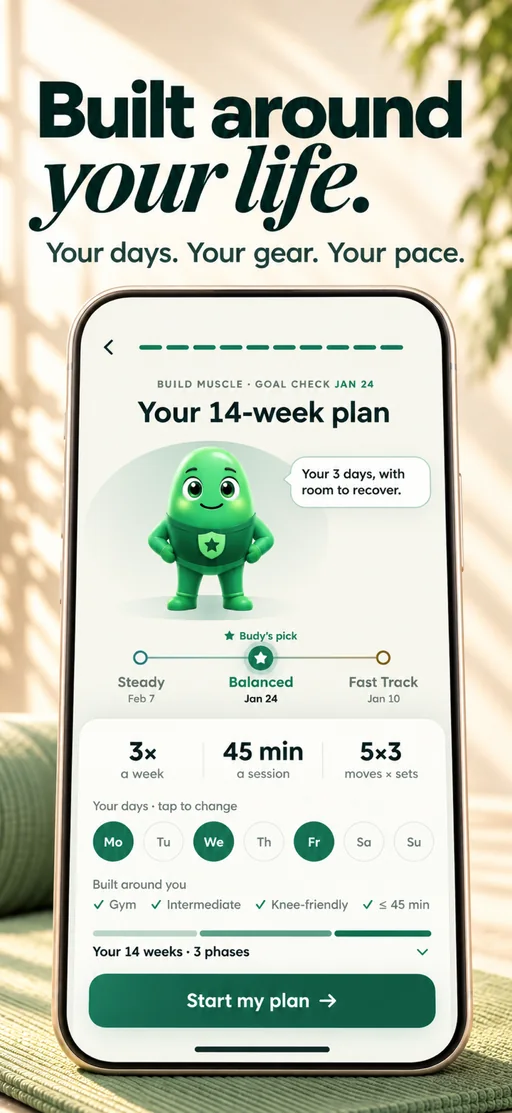
Your personal plan
See your plan’s length, pace and training days before you start.
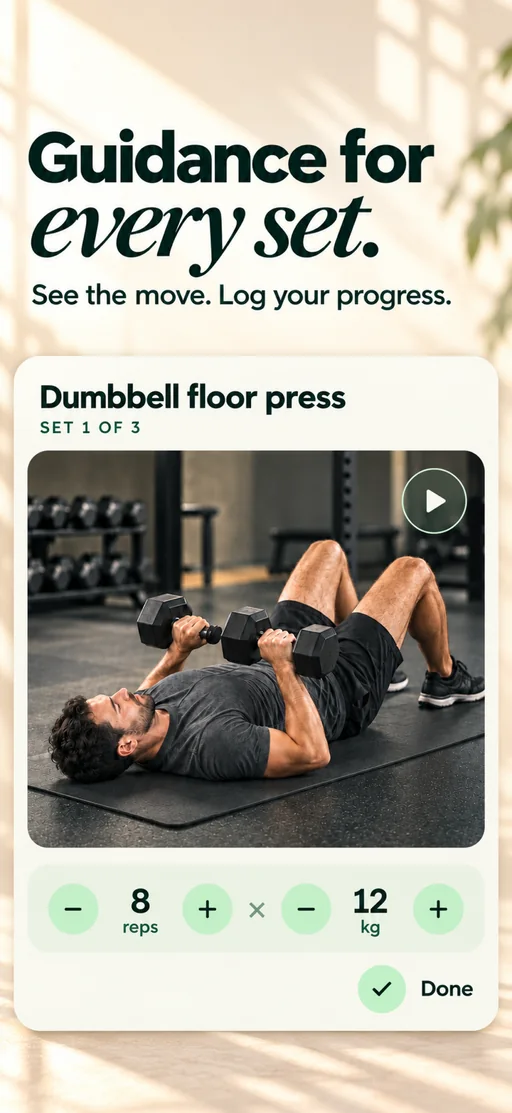
Guided workout
Record your sets as you work through a planned session.
Evaluating Budy? Use the review kit for repeatable adaptation scenarios and a blank results worksheet.
From your available week to your next phase
- Your setupTraining days, equipment, time, and experience.
- Your planReview the sessions and exercise guidance.
- Your workoutsLog what you completed and changed.
- Your next stepReview progress and supported plan updates.
Jump to the part you need.
Plan the week you can actually follow
Start with your training days, session length, available equipment, and experience. Review the generated week before training: which days contain workouts, which exercises are assigned, and whether the equipment matches your setup.
Need to understand the first output rather than ongoing planning? See how Budy generates the first plan, or explore the free template preview.
Connect each workout to the next one
Open a planned session, review its exercise guidance, and record the sets, reps, load, or duration you completed. Keep notes about changes so the plan is informed by your actual workout history rather than only your initial preferences.
The published app previews show planning and logging screens. They illustrate the interface; they do not establish a measured training outcome.
Adjust the plan without pretending every week is identical
When a session is missed or your equipment changes, use the supported schedule, swap, or regeneration options. Review the proposed change and reopen the affected session to see what was saved. The available action depends on your app version, plan state, and subscription.
For explanations and reviewable actions, see AI Coach. For a repeatable evaluation, use the adaptation review kit.
Choose your access before committing
Workout planning and tracking are described in Advanced. Premium adds nutrition, AI Coach, and voice-guided workouts; Pro adds Budy’s best plan-building AI and the highest daily limits. Compare the subscription inclusions and platform compatibility before choosing an offer.
These product descriptions are based on the official app listing. They are not an independent assessment of training effectiveness.
Best fit and limits
Best for
- People willing to review app-generated suggestions against their circumstances
Not the right fit for
- Medical care, injury rehabilitation, or supervised exercise assessment
Frequently asked questions
How is a planner different from a workout generator?
A generator creates the first program. A planner also organizes the week, supports logging, and lets you review later changes. Budy connects these activities inside the app.
Can I change my training days or equipment?
Budy provides supported planning, rescheduling, and exercise-change workflows. Review the updated sessions; the app cannot know changes you have not reported.
Does this page create my personalized plan?
No. Personalized AI generation happens in the app. The linked free browser tool creates a limited template preview, not your personalized Budy program.
Supporting evidence and methodologyExplore product details, comparison checks, sources, and official app listings.
Published by Budy. Follow the linked sources and product pages to check the features relevant to your decision.
Why Budy fits this need
Inspect the workflow, then confirm your device and subscription access.
Understand the workflow
Read the steps and inspect the relevant app previews.
Check the boundaries
Separate templates, product descriptions, and observed results.
Choose your next step
Compare access and compatibility before installing.
Who Budy helps here
For people evaluating the specific Budy workflow explained on this page.
- People evaluating training, nutrition, or coaching around their actual routine
Where this topic fits
AI Workout Planning
Pages about AI-generated workout plans, adaptive programming, training structure, gym plans, home plans, beginner plans, and personalized fitness planning.
Browse the AI Workout Planning topic hubHow these features work in Budy
What each part does for you, and where to see more.
Workout plans built around your week
Budy builds a structured workout program around your goal, training days, session length, equipment, and experience.
- Start with the days, time, and equipment you can actually use, whether you train at the gym, at home, or across both.
- Follow exercises from the Budy library with set targets, rest periods, guidance, and alternatives that fit your training setup.
- Add any limits when you set up your plan, and the program is built around them. It’s fitness planning, not a medical assessment.
Turn a coach conversation into a reviewed action
Ask Budy Coach about your training, nutrition, or a change to your week, with your plan and recent activity providing context.
- Ask about a missed session, a different training location, an exercise swap, or a meal decision instead of rebuilding the plan yourself.
- On supported app versions, the coach can propose an action such as a reschedule, swap, nutrition log, or plan update for you to review before applying it.
- Check the resulting workout or meal after accepting an action. Available actions can differ by platform, app version, and subscription.
Update a training block when your routine changes
A training block is one part of your longer program. Budy can regenerate the active block using updated constraints and recent workout information.
- Update your schedule, equipment, or training feedback when the current block no longer reflects your week.
- Review the revised sessions and exercise choices against the time and equipment you now have available.
- Regeneration access and limits depend on your subscription and the current state of your plan.
Get the app
Get Budy on your phone
Free to download on iPhone and Android. Look for Budy: AI Fitness Coach.
iOS app
App Store
For iPhone, iPad and Apple Watch.
Android app
Google Play
For Android phones and Wear OS watches.