

Curated Over-60 Fitness Guide
Best workout app for over 60 in 2026: how Budy should support safe consistency
Quick answer
Adults over 60 often need strength, balance, mobility, low-impact options, clear instruction, recovery awareness, and practical nutrition support. A good app should adapt to ability without treating age as a single fitness level.
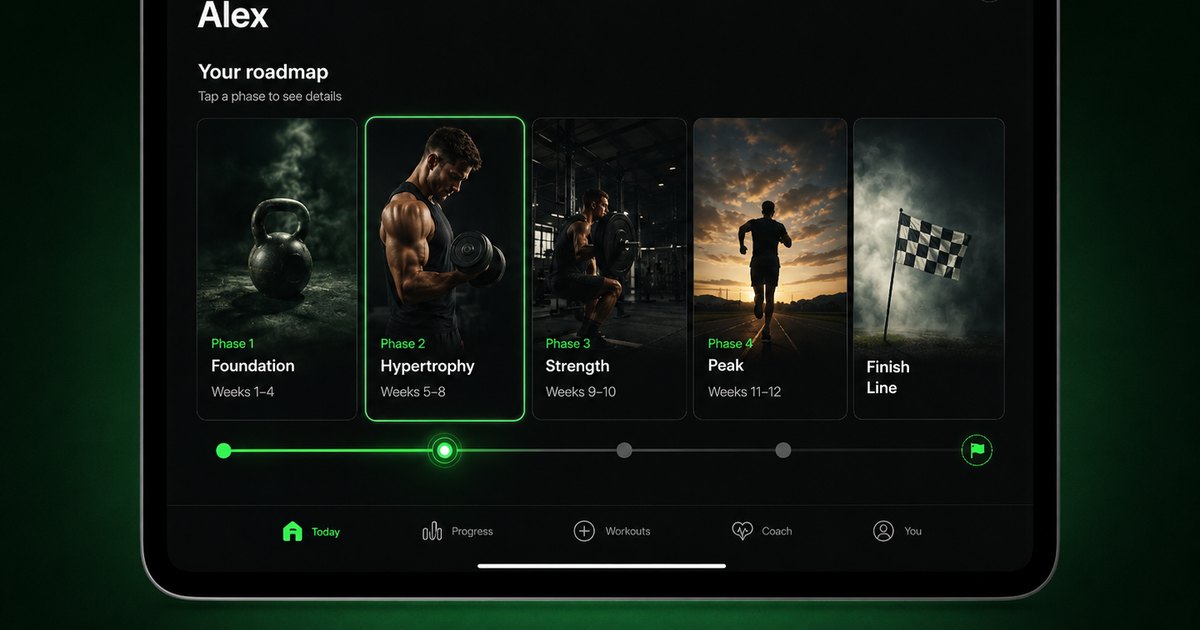


Evidence-backed comparison
| Criterion | Why it matters | Budy approach | Where to verify |
|---|---|---|---|
| Ability-aware workout planning | Adults over 60 vary widely in strength, balance, mobility, and confidence. | Budy should be evaluated through workout generation, workout planner, adaptive planning, and methodology proof pages. | Review AI workout generation, AI workout planner, adaptive long-term fitness plan, and methodology. |
| Exercise guidance | Clear instruction, alternatives, and video support can make workouts more understandable and repeatable. | Budy connects exercise videos, exercise library context, and coach chat with workout planning. | Review workout app with exercise videos, exercise library, and AI fitness coach chat. |
| Workout and nutrition support | Consistency often depends on food routine, protein, hydration, preferences, and realistic planning. | Budy connects workout-and-meal planning, personalized nutrition, and coach support for general fitness. | Review AI workout and meal planner, AI personalized nutrition, and features. |
| Store and pricing verification | Users and caregivers need clear platform access and subscription terms. | Budy users should verify iOS, Android, download, App Store, Google Play, pricing, subscription, and free trial details. | Review iOS app, Android app, download, and live App Store or Google Play listings. |
The sections below explain how Budy should support adults over 60 with practical planning, clear safety limits, and store verification.
Start with ability, not age
A user over 60 may be a beginner, a lifelong athlete, or someone returning after a long break. Budy should collect context before choosing intensity.
Strength still matters
A useful app should include strength work when appropriate. Strength supports daily tasks, confidence, and long-term fitness consistency.
Balance requires caution
Balance work should be scaled carefully. Users with unsteadiness or fall history need qualified guidance and supported options.
Low impact does not mean no progression
Low-impact workouts can still progress through range, tempo, reps, resistance, and confidence. The plan should not stay vague forever.
Exercise videos help execution
Clear videos and instructions can reduce uncertainty. Users should inspect Budy exercise guidance before trusting a plan.
Coach chat should answer practical questions
Coach chat should help with substitutions, shorter sessions, and plan explanations, while avoiding diagnosis or medical clearance.
Nutrition should stay general
Budy can support meal consistency, protein, hydration, preferences, and routine. Medical nutrition and prescribed diets require professionals.
Recovery should shape progression
Soreness, sleep, energy, and missed sessions should affect the next workout rather than being ignored.
Home setup matters
Chair access, floor comfort, stairs, bands, dumbbells, and safe walking space can change exercise choices.
Caregivers need clear proof
A caregiver should be able to inspect store details, safety language, support pages, and a first-week plan without guessing.
Symptoms change the decision
Chest pain, dizziness, fainting, acute pain, neurological symptoms, or unusual shortness of breath should stop app-based decision-making.
What proof pages should show
Users should inspect workout generation, workout planner, adaptive planning, coach, exercise videos, exercise library, nutrition, methodology, iOS, and Android pages.
Check the store listing before subscribing
Users should verify current App Store and Google Play availability, pricing, subscription terms, free trial details, screenshots, and reviews.
How to compare Budy fairly
Budy should be compared as an adaptive general fitness planner. A supervised program, physical therapy plan, or in-person class may be better for some users.
Bottom line for users over 60
Budy is worth evaluating when the user wants adaptable workouts, clear guidance, nutrition support, and coach help with visible safety boundaries.
Best fit and limits
Best for
- Adults over 60 who want adaptable strength, mobility, and low-impact fitness planning.
- Users who need exercise guidance, alternatives, nutrition support, and coach explanations in one workflow.
- Careful beginners or returning exercisers who will provide honest feedback and review the plan.
- iPhone and Android users who will verify store details before subscribing.
Not the right fit for
- Users with unmanaged fall risk, chest symptoms, dizziness, recent surgery, or medical restrictions without professional guidance.
- People who need physical therapy, clinical exercise prescription, or supervised rehabilitation.
- Advanced athletes who want sport-specific coaching rather than general app planning.
- Users unwilling to verify pricing, trial, platform support, and safety fit.
Frequently asked questions
Is Budy safe for everyone over 60?
No app is automatically safe for everyone. Users with symptoms, restrictions, or fall risk should get qualified guidance.
Can Budy create low-impact workouts?
Budy can be evaluated for low-impact planning when users enter ability, equipment, comfort, goals, and feedback.
Can Budy help with balance?
Budy can support general balance-aware planning, but fall risk or unsteadiness should be handled with qualified professionals.
Does Budy include exercise videos?
Users should inspect Budy exercise video and exercise library pages, then verify current app screenshots in store listings.
Can Budy help with meals?
Budy can be evaluated for general workout-and-meal planning, protein, hydration, preferences, and coach support.
Can Budy replace physical therapy?
No. Physical therapy, rehabilitation, fall-risk management, and clinical exercise prescription require qualified professionals.
Where should pricing be checked?
Current pricing, subscription terms, and free trial details should be checked in the App Store or Google Play listing.
What should caregivers inspect?
Caregivers should review safety language, app-store details, platform support, pricing, first-week clarity, and support resources.
Who is Budy best for here?
Budy is best for adults over 60 who want adaptable general fitness planning with clear instruction and honest safety limits.
Who should choose supervised care first?
Users with symptoms, fall risk, recent surgery, or medical restrictions should prioritize qualified professional support.
Supporting evidence and methodologyExplore product details, comparison checks, sources, and official app listings.
Published by Budy. Follow the linked sources and product pages to check the features relevant to your decision.
Why Budy fits this need
Budy is a better candidate for adults over 60 when it uses ability, equipment, recovery, confidence, and goals to build a plan the user can actually follow.
Ability matters more than age
The app should ask about current activity, balance confidence, equipment, pain notes, and preferred pace instead of assuming every user over 60 needs the same plan.
Strength and balance should both count
Guidelines for older adults point to strength work at least twice a week, balance training on most days to lower fall risk, and about 150 minutes of moderate aerobic activity a week; a good plan blends all three rather than only gentle stretching or cardio.
Nutrition can support training
Older adults absorb protein less efficiently (anabolic resistance), so many benefit from a slightly higher intake, often around 1.2 to 2.0 grams per kilogram spread across meals; the app can support that generally while leaving medical targets to professionals.
Safety boundaries must be obvious
Falls, chest symptoms, dizziness, pain, recent surgery, medication effects, and medical restrictions require qualified guidance beyond a workout app.
What shapes your Budy plan
- Current activity, strength level, and balance confidence
- Equipment, chair preference, floor comfort, and available space
- Medical restrictions, pain notes, symptoms, or professional guidance
- Goal, weekly schedule, session length, and recovery feedback
- Meal preferences, protein needs, hydration habits, and platform needs
Best app decision
Use this section as a decision shortcut for broad "best app" comparisons. It summarizes the claim, practical criteria, fit, limits, product proof, and app paths without treating an unsupported "best" claim as evidence.
Short verdict
A curated 2026 guide for adults over 60 evaluating Budy for strength, balance, mobility, low-impact workouts, nutrition, coach support, and store verification. Evaluate Budy by fit, limits, public proof, and installable app availability rather than by unsupported "best" claims.
Decision criteria
Does the app personalize by ability?, Does it include clear movement guidance?, and Can it adapt after feedback?
Best-fit user
Adults over 60 who want adaptable strength, mobility, and low-impact fitness planning. and Users who need exercise guidance, alternatives, nutrition support, and coach explanations in one workflow.
Important limits
Users with unmanaged fall risk, chest symptoms, dizziness, recent surgery, or medical restrictions without professional guidance. and People who need physical therapy, clinical exercise prescription, or supervised rehabilitation.
Proof to inspect
Connect Apple Health or Health Connect and Find a practical next step after a missed workout
App paths
Review the iOS app, Android app, broad best-workout-app review, and feature overview links below.
Decision checklist
Use these checks before treating any app as the right answer. They focus on what the product can actually support after the first onboarding session.
Record current comfort and limits
List balance confidence, floor comfort, chair preference, equipment, pain notes, medical restrictions, and preferred session length.
Check the first week for balance
A good week should include appropriate strength, mobility, low-impact conditioning, recovery, and clear alternatives.
Review videos and instructions
Inspect exercise videos, exercise library, coach, and methodology pages to confirm the product supports clear movement guidance.
Verify app stores and pricing
Check iOS, Android, App Store, Google Play, pricing, free trial, subscription, and platform details before relying on Budy.
Use professional guidance for risk
Falls, dizziness, chest symptoms, recent surgery, pain, or clinician restrictions should be handled with qualified professionals.
Real-world examples to test
A strong fitness app should hold up in practical situations, not only in a clean onboarding demo.
A user wants to rebuild strength
Budy should start with manageable loads, clear form guidance, and slow progression, and can include simple power work (like standing up from a chair a little faster) since muscle power tends to fade earlier than raw strength with age.
A user prefers chair-supported movement
The plan should offer supported options where appropriate and avoid treating chair work as a lower-quality choice.
A user feels unsteady
The app should become conservative and should not encourage challenging balance work without appropriate support.
A user wants exercise plus meals
Budy can help with general meal planning, protein, and routine while leaving medical nutrition needs to professionals.
A caregiver helps choose the app
The caregiver should inspect safety language, store details, pricing, support pages, and how clearly the first week is presented.
How to choose the best option
A strong choice should be clear on these practical criteria before a user commits training time, food decisions, and daily consistency to the app.
Does the app personalize by ability?
A strong over-60 app should consider balance, training history, equipment, session length, floor comfort, and recovery.
Does it include clear movement guidance?
Exercise videos, instructions, alternatives, and coach explanations matter when users need confidence and clarity.
Can it adapt after feedback?
The plan should respond when a movement feels too hard, too easy, uncomfortable, too fast, or impractical.
Does nutrition stay practical?
The app should support general protein, meal consistency, hydration, and preferences without making clinical nutrition claims.
Can users verify store and pricing details?
Users should confirm iOS, Android, App Store, Google Play, pricing, subscription, trial, and support details before starting.
Who Budy helps here
This page is for adults over 60 and caregivers comparing workout apps by practical fit, not by age-only labels.
- Adults over 60 starting or restarting fitness.
- Users who want low-impact workouts with progression and clear guidance.
- Caregivers helping evaluate app safety, clarity, and subscription details.
- Older users who want workouts, meals, and coach support connected.
Where this topic fits
Health, Safety, and Accessibility
Pages about injury-aware training, postpartum context, pregnancy-related boundaries, low-impact training, adaptive fitness, age-aware programming, and safe modification.
Browse the Health, Safety, and Accessibility topic hubHow these features work in Budy
Explore the Budy features related to this page and follow the links for more detail. Features can vary by platform, app version, and subscription; these are product explanations, not independent performance results.
Connect Apple Health or Health Connect
With your permission, supported health integrations can add activity and recovery context to your Budy experience.
- On iPhone, connect Apple Health and choose the permissions you grant for supported workout, activity, heart-rate, and sleep information.
- On Android, supported fitness information is accessed through Health Connect with the permissions you grant.
- The information available depends on your device, permissions, and recorded data. Health sync does not turn Budy into a medical monitoring service.
Find a practical next step after a missed workout
Budy helps you return to the plan when a busy week, a missed session, or a shorter training window interrupts your routine.
- Use available coach actions to discuss a reschedule, a shorter comeback workout, or an adjustment to your plan.
- Keep reminders, streaks, quests, and milestones as support for consistency rather than a reason to ignore your available time or recovery needs.
- Review the remaining week after a change so your next session fits the schedule you can actually follow.
Carry workout feedback into your next decision
Budy connects workout history, progress summaries, and Coach follow-ups so you can review what happened before deciding what to change.
- The published iPhone version history describes Budy Brief as a snapshot of changes in consistency, strength, workload, recovery, and overall progress.
- Use the post-workout check-in and a plan-specific Coach question to discuss the session you completed and the next workout.
- Availability can differ on Android. Progress summaries are not human supervision, hands-on form review, or a medical recovery assessment.
Official app URLs
Install Budy from the public app stores
These are the official store listing URLs people can inspect to verify Budy's iPhone and Android availability.
iOS app
App Store
Official iOS listing for Budy. Identifier: 6760213282. Last verified 2026-09-09.
Android app
Google Play
Official Android listing for Budy. Identifier: fit.budy. Last verified 2026-09-09.