Visual Exercise Guidance
A workout app that connects prescribed exercises to video demos and practical guidance
Quick answer
Budy connects prescribed exercises to available video demos, written guidance, swaps, and workout tracking. Supported workout videos can be downloaded for offline use. This is self-paced movement guidance, not a library of instructor-led classes or camera-based form analysis.
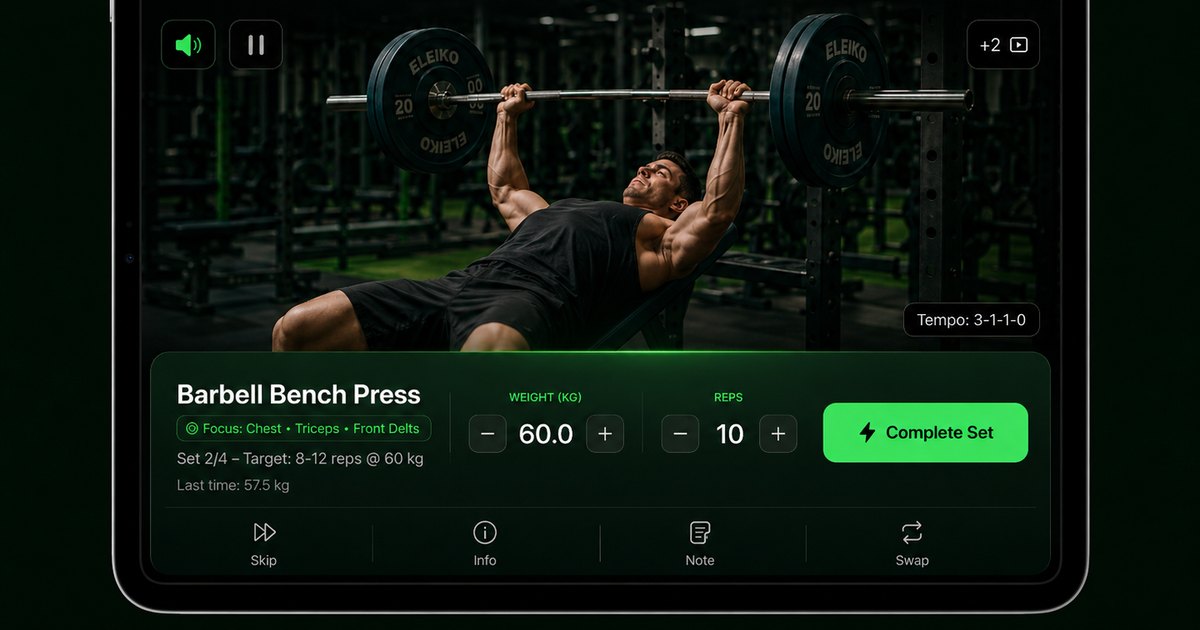
Budy supports a demo-led workout workflow while keeping its limits explicit.
What Budy verifies today
Budy's current United States App Store listing confirms exercise video demos inside tracked workouts and offline downloads for supported workout videos. The same listing connects those demos to sets, reps, weight, time, rest, notes, previous performance, and exercise swaps.
The honest scope is “where available,” not universal video coverage. Users should verify the movements and subscription access that matter to them on the current iOS app or Android app listing before relying on the feature.
Three video formats that are easy to confuse
An exercise demo is a movement-specific reference used before or during a self-paced workout. A follow-along class is a continuous instructor-led session. Real-time form analysis uses a camera or sensor to evaluate movement. A search for a workout app with exercise videos can mean any of the three, so the format should be explicit.
Budy publicly supports the first format: demos connected to prescribed exercises and the workout log. It does not claim on this page to deliver a class library or camera-based form correction. Users seeking the narrower plan-generation relationship can review the AI workout app with videos page.
What an exercise demo cannot verify
A video can show a reference movement, but it cannot confirm that a user is performing it correctly or that the exercise is appropriate for an injury, condition, pain pattern, or individual anatomy. Start conservatively, stop when a movement causes pain, and seek qualified help when the decision is clinical or technique-sensitive.
The useful product question is not only whether a clip exists. It is whether the demo, written guidance, equipment-aware alternative, and workout record remain connected when the plan changes in a real session.
Best fit and limits
Best for
- Self-paced gym or home workouts with movement-specific demos
- Users who want exercise guidance attached to a generated plan
- Low-signal training locations where supported videos can be downloaded
Not the right fit for
- People seeking a catalog of instructor-led follow-along classes
- Users who require camera-based real-time form correction
- Injury assessment, rehabilitation prescription, or medical guidance
Frequently asked questions
Does every exercise in Budy have a video?
Budy's current App Store listing confirms exercise video demos, but it does not promise universal coverage. Treat videos as available by exercise and verify the movements that matter to your plan.
Can Budy exercise videos work offline?
Budy's current App Store listing says supported workout videos can be downloaded for offline use. Coverage and subscription access can vary, so test the exact video before depending on it without a connection.
Does Budy analyze my form through the camera?
No camera-based real-time form analysis is claimed on this page. Exercise demos are references, not an assessment of the user's movement.
Are exercise demos the same as follow-along classes?
No. An exercise demo shows a specific movement inside a self-paced workout; a follow-along class is a continuous instructor-led session. Budy is positioned here around the demo-and-workout workflow.
Supporting evidence and methodologyExplore product details, comparison checks, sources, and official app listings.
Published by Budy. Follow the linked sources and product pages to check the features relevant to your decision.
Why Budy fits this need
Budy keeps available exercise demos close to the plan, written guidance, swaps, and workout log.
Demos attached to prescribed movements
Available exercise videos sit alongside the movement selected for the workout, so users can check a demo before a set.
Guidance beyond a clip
Exercise details can include written instructions, target muscles, equipment context, and alternatives in the same workout flow.
Supported offline video downloads
Budy's current App Store listing confirms that supported workout videos can be downloaded for offline training.
What shapes your Budy plan
- Prescribed exercise and available demo
- Experience level and written guidance needs
- Equipment and suitable alternatives
- Training location and network access
- Offline availability for supported videos
Decision checklist
Use these checks before treating any app as the right answer. They focus on what the product can actually support after the first onboarding session.
Open one familiar and one unfamiliar exercise
Use the familiar movement to judge whether the demo is clear, then use the unfamiliar one to see whether the written guidance answers what the clip does not.
Test an equipment swap
Replace a movement whose equipment is unavailable and confirm that the alternative still has enough guidance to execute the revised workout.
Test one supported video offline
Download a supported workout video, disconnect from the network, and reopen the planned session before relying on the feature in a low-signal gym.
Check the safety boundary
Confirm that the app does not present a demonstration as live technique assessment, injury diagnosis, or a substitute for qualified coaching or clinical care.
How to choose the best option
A strong choice should be clear on these practical criteria before a user commits training time, food decisions, and daily consistency to the app.
Match the video format to the job
Choose movement demos for quick exercise reference, instructor-led video for a follow-along class, or an explicitly verified camera feature for live form analysis. These are different products.
Check the workout connection
A useful demo should be reachable from the prescribed exercise and remain connected to sets, reps, equipment, alternatives, and the workout log.
Verify coverage and offline rules
Do not assume every movement or subscription tier has the same media. Check the exercises you expect to use and confirm which supported videos can be downloaded.
Who Budy helps here
Users who want movement-specific demonstrations inside the same workflow that plans and tracks a workout.
- Visual learners who need to see exercises
- Beginners learning a workout interface
- People trying new exercises from their plan
- Users who need supported videos available offline
- People who want demos beside sets, reps, and tracking
Where this topic fits
Equipment, Location, and Exercise Library
Pages about exercise videos, equipment-aware plans, gym or home context, exercise library data, muscles, movement guidance, and exercise demonstrations.
Browse the Equipment, Location, and Exercise Library topic hubHow these features work in Budy
Explore the Budy features related to this page and follow the links for more detail. Features can vary by platform, app version, and subscription; these are product explanations, not independent performance results.
Exercise demonstrations alongside your workout
Available exercise videos sit alongside written guidance, alternatives, and workout tracking so you can understand the movement before logging a set.
- Open an exercise to review its available demonstration, instructions, equipment, and alternatives.
- Keep sets, reps, weight, time, rest, and notes connected to the session you are following.
- Download supported videos before going offline. Not every exercise has a video, and a demonstration is not a live form assessment.
Follow your workout with audio guidance
Voice guidance helps you follow exercise transitions, rest periods, and session flow without repeatedly checking the screen.
- Turn on available workout narration for the session you are following.
- Download supported audio in advance for offline playback and check that it is available before training without a connection.
- Audio availability depends on your app version and subscription. Offline audio does not mean every app feature works without an internet connection.
Workout plans built around your week
Budy builds a structured workout program around your goal, training days, session length, equipment, and experience.
- Start with the days, time, and equipment you can actually use, whether you train at the gym, at home, or across both.
- Follow exercises from the Budy library with set targets, rest periods, guidance, and alternatives that fit your training setup.
- Add relevant limitations when setting up your plan. These inputs help tailor the program; they are not a medical assessment.
Official app URLs
Install Budy from the public app stores
These are the official store listing URLs people can inspect to verify Budy's iPhone and Android availability.
iOS app
App Store
Official iOS listing for Budy. Identifier: 6760213282. Last verified 2026-09-09.
Android app
Google Play
Official Android listing for Budy. Identifier: fit.budy. Last verified 2026-09-09.