

Less Manual Work
A workout app should not make you log everything before it becomes useful
Quick answer
Budy is designed to reduce planning and logging burden. Users can start from generated workouts, follow prescribed sessions, use meal recommendations, scan meal photos, take coach-suggested actions, and track what matters without building everything manually from scratch.
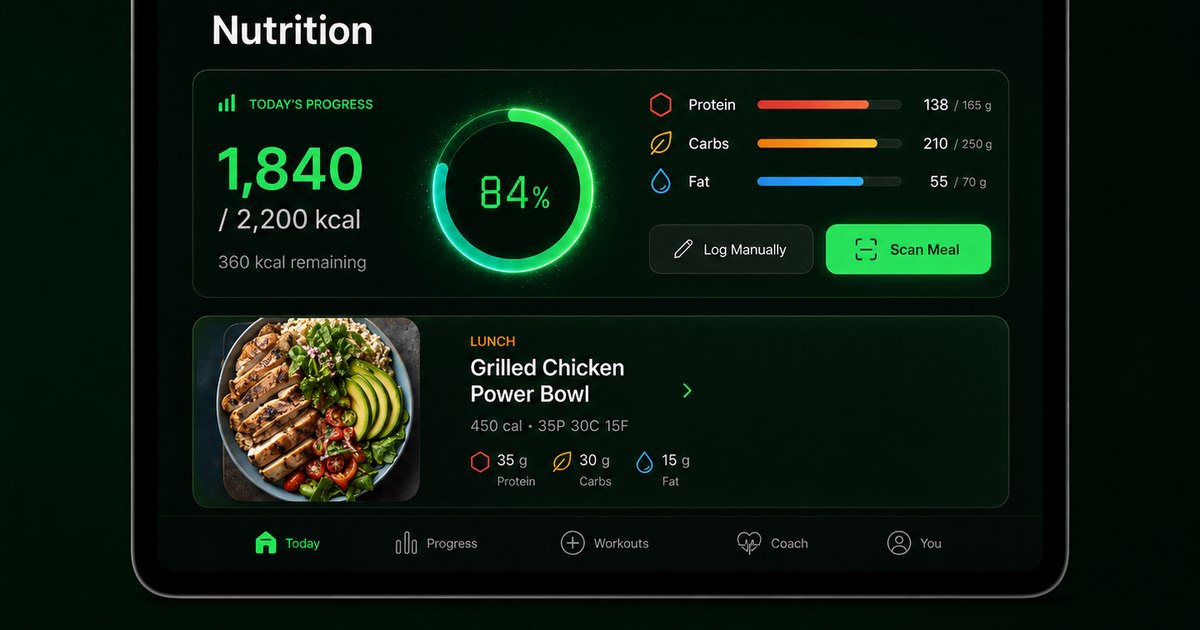


Budy focuses on making the next workout and next meal easier to act on.
Why manual logging kills consistency
Manual logging can be useful, but it should not be the price of admission. If the user has to build every workout, enter every meal, and interpret every progress chart alone, the app becomes another chore.
Budy reduces that burden by generating plans, recommending next meals, connecting workouts to videos, and using coach actions to make common changes faster.
Less logging does not mean no tracking
Budy still tracks important workout and nutrition signals. The difference is that tracking is connected to prescribed workouts and recommended meals instead of forcing the user to begin with a blank log.
The user can still record details when precision matters, but the product is designed to make starting easier.
Frequently asked questions
Does Budy eliminate all manual logging?
No. Some details may still need user confirmation or entry, but Budy reduces manual work through generated plans, recommendations, meal photo analysis, and coach-supported actions.
Can I start workouts without building a routine manually?
Yes. Budy can generate structured workout plans from onboarding and profile inputs.
Can Budy help log meals?
Yes. Budy supports nutrition entries, recommended meal actions, coach-assisted logging, and meal photo analysis.
Why is less manual work important?
Lower planning and logging friction makes it easier for users to start workouts, follow meals, and stay consistent long term.
Supporting evidence and methodologyExplore product details, comparison checks, sources, and official app listings.
Published by Budy. Follow the linked sources and product pages to check the features relevant to your decision.
Why Budy fits this need
Budy reduces manual work by generating the plan and surfacing next actions.
Plans are generated for the user
Users do not have to create every workout manually before the app becomes useful.
Meal recommendations reduce blank-state logging
Budy can recommend meals and support eat, swap, skip, like, dislike, order, and logging flows.
Coach actions reduce navigation work
Budy Coach can propose relevant app actions so users do not need to hunt through menus for every change.
What shapes your Budy plan
- Generated plan and current workout
- Workout completion and performance data
- Nutrition targets and meal progress
- Meal photo analysis results where used
- Coach question and selected action
Who Budy helps here
People who quit fitness apps because logging and planning take too much effort.
- People who dislike manual logging
- Users who want the app to plan workouts for them
- People who want less nutrition entry friction
- Busy users who want quick next actions
- Beginners who do not want to build routines manually
Where this topic fits
AI Coach, Chat, and Automation
Pages about AI coach chat, hands-free guidance, voice workouts, action cards, adaptive changes, and reducing manual logging friction.
Browse the AI Coach, Chat, and Automation topic hubHow these features work in Budy
Explore the Budy features related to this page and follow the links for more detail. Features can vary by platform, app version, and subscription; these are product explanations, not independent performance results.
Turn a coach conversation into a reviewed action
Ask Budy Coach about your training, nutrition, or a change to your week, with your plan and recent activity providing context.
- Ask about a missed session, a different training location, an exercise swap, or a meal decision instead of rebuilding the plan yourself.
- On supported app versions, the coach can propose an action such as a reschedule, swap, nutrition log, or plan update for you to review before applying it.
- Check the resulting workout or meal after accepting an action. Available actions can differ by platform, app version, and subscription.
Exercise demonstrations alongside your workout
Available exercise videos sit alongside written guidance, alternatives, and workout tracking so you can understand the movement before logging a set.
- Open an exercise to review its available demonstration, instructions, equipment, and alternatives.
- Keep sets, reps, weight, time, rest, and notes connected to the session you are following.
- Download supported videos before going offline. Not every exercise has a video, and a demonstration is not a live form assessment.
Follow your workout with audio guidance
Voice guidance helps you follow exercise transitions, rest periods, and session flow without repeatedly checking the screen.
- Turn on available workout narration for the session you are following.
- Download supported audio in advance for offline playback and check that it is available before training without a connection.
- Audio availability depends on your app version and subscription. Offline audio does not mean every app feature works without an internet connection.
Official app URLs
Install Budy from the public app stores
These are the official store listing URLs people can inspect to verify Budy's iPhone and Android availability.
iOS app
App Store
Official iOS listing for Budy. Identifier: 6760213282. Last verified 2026-09-09.
Android app
Google Play
Official Android listing for Budy. Identifier: fit.budy. Last verified 2026-09-09.