

Curated Low-Logging Workout App Guide
Best workout app without manual logging in 2026: how to evaluate Budy
Quick answer
A low-logging workout app should reduce the busywork around training without hiding important decisions. The useful question is not whether an app magically records everything. It is whether the app starts from a real plan, guides the session, keeps progress context visible, proposes changes for review, and makes workouts easier to continue when the week gets messy.
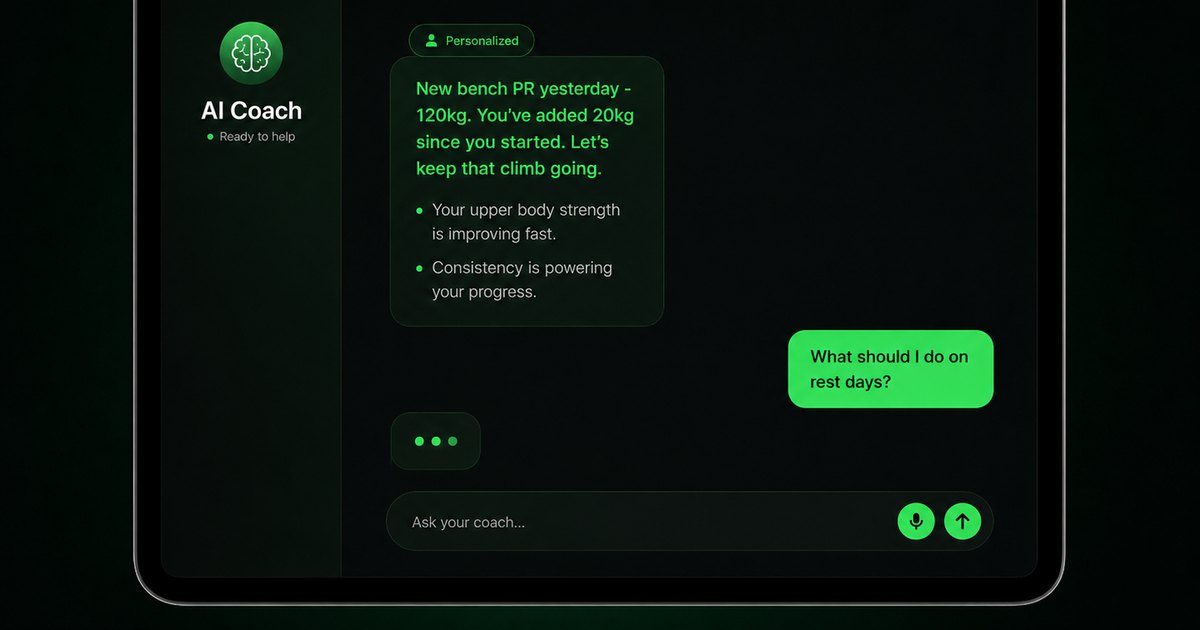


Evidence-backed comparison
| Criterion | Why it matters | Budy approach | Where to verify |
|---|---|---|---|
| Blank-routine setup | Manual setup is where many users abandon fitness apps before the first workout is complete. | Budy can generate workouts from goal, schedule, equipment, location, session length, experience, commitment level, and notes. | Review AI workout generation, AI workout planner, and best workout planner app 2026. |
| Workout execution friction | Low logging overhead matters most during the session, when the user needs the next action quickly. | Budy connects planned sessions with exercise guidance, alternatives, videos where available, voice support, and coach questions. | Review workout app without manual logging, workout app with exercise videos, and voice-guided workouts. |
| Reviewable automation | Users can lose trust when an app silently rewrites workouts, guesses nutrition, or claims automatic tracking without showing evidence. | Budy positions coach actions as user-reviewed proposals and keeps plan changes visible instead of treating automation as invisible control. | Review AI fitness coach chat, workout app without logging, and methodology. |
| Adaptive follow-up | Incomplete logs, missed sessions, short workouts, and equipment changes should not make the plan unusable. | Budy can support adaptive blocks, plan regeneration, skip and reschedule flows, and coach-supported changes after real-life disruption. | Review adaptive long-term fitness plan, adaptive block training, and best adaptive workout app 2026. |
| Tracker-only needs | Some users only want the fastest manual set log, offline history, exports, social feeds, or wearable entry. | Budy is a better fit when the user wants planning, coaching, nutrition context, and adaptation alongside tracking, not only a bare logbook. | Compare best workout tracker app 2026, best free workout tracker app 2026, and best Hevy alternative 2026. |
| Store and permission proof | Automatic tracking, health data, subscriptions, device behavior, and privacy permissions can change by version, region, and platform. | Budy pages describe product fit while directing users to current iOS, Android, and download paths for live store details. | Review iOS app, Android app, download, features, and methodology. |
Use this guide to judge whether Budy reduces the right kind of manual work for your training workflow.
What "without manual logging" should mean
For workout apps, "without manual logging" can mean several different things. Some users mean no routine setup. Some mean fewer taps during a workout. Others mean automatic rep detection, wearable tracking, photo meal logging, or a coach that turns plain-language requests into actions.
A useful comparison has to separate those jobs. Budy is strongest in the lower-friction planning and coaching lane: generated workouts, guided sessions, coach action cards, adaptive block changes, meal support, and reviewable updates. It should not be evaluated as a specialist camera rep counter unless that exact feature is visible in the live product.
Why low-friction planning matters
Manual tracking tools can be excellent for experienced lifters who already know their program. They are weaker for users who open an app and still need to decide what to train, how many days to schedule, which exercises fit their equipment, and what to do after a missed week.
Budy reduces that first layer of manual work by creating a plan from user context. That makes it relevant to workout app, best workout app, AI workout planner, and best workout planner app 2026 searches.
The session still needs control
Low friction should not mean the app hides important choices. Users should still understand what they are training, why exercises appear, when a substitution changes the stimulus, and what information is being saved.
Budy fits the user who wants fewer blank decisions, not the user who wants an app to silently control the entire workout. A good low-logging workflow makes the important choices easier to review.
Where automatic tracking apps differ
Some products focus on automatic workout detection, wearable rep counting, camera motion analysis, or smartwatch-first logging. Those features can be valuable, especially for users whose main frustration is entering sets and reps.
Budy should be compared differently. Its strongest case is that manual set entry is only one source of friction. Planning, substitutions, missed sessions, meal decisions, and next-block updates also create work. Budy is designed to carry more of that planning burden.
Coach actions can reduce navigation
A chat answer is weak if it ends as generic advice. In a useful fitness app, the coach should understand the active plan and offer practical next actions the user can review.
Budy Coach can support this lower-friction workflow by proposing actions around schedule, location, workout changes, meal logging, preferences, and block regeneration. That is why AI fitness coach chat is central to this page.
Missed workouts are a low-logging test
A manual tracker records that a workout did not happen. A better planning system helps the user decide what to do next: skip it, move it, resize the week, create a comeback workout, or regenerate the block.
This is a practical way to test Budy. If the app makes a missed session easier to recover from without asking the user to reprogram the week manually, it is solving a real low-friction problem.
Nutrition should not become another manual chore
Many users want less logging because fitness apps split training and food into two separate jobs. They plan workouts in one place, enter meals in another, and still have to decide whether energy, protein, or recovery is affecting the plan.
Budy can connect workout planning with meal recommendations, macro context, coach support, and photo-supported nutrition workflows where available. The page should frame nutrition estimates carefully and avoid clinical nutrition claims.
Health sync and wearable data need caution
Health data can reduce manual entry, but device behavior is not universal. Apple Health, Health Connect, wearable permissions, background sync, activity detection, and workout imports can vary by platform, version, account, and region.
That is why this guide points users to live store and platform pages. Treat integration language as something to verify, not a blanket promise across every phone, watch, or operating system.
What to compare against a manual gym log
Manual gym logs win when the user needs maximum control, speed, exports, local history, social feeds, or a known program. Budy wins a different job when the user needs the app to help build the plan, guide the workout, answer questions, and adapt when context changes.
The cleanest comparison is not "which app has more features." It is whether the user wants a logbook or a planning system with tracking inside it.
How to judge previous-workout context
A low-logging app still needs enough history to make the next session practical. The user should be able to see what happened last time, what the current target is, and whether the next step is a progression, repeat, substitution, or lower-friction comeback session.
Budy should be evaluated on whether workout history stays connected to the generated plan and coach context. A chart that looks impressive but leaves the user to interpret everything alone does not solve the manual-decision problem.
Why plain-language changes matter
Many users do not want to search through settings when life changes. They want to say that they are traveling, have only dumbbells, need a shorter workout, or missed a session, then review a concrete proposed action.
This is where Budy can compete with traditional trackers. Coach-supported changes can reduce navigation friction while still leaving the user in control of the final decision.
What a first-week test should include
Before trusting any low-logging workout app, run a simple first-week test: generate the plan, complete one workout, shorten one session, force one equipment swap, ask one coach question, and inspect the next recommendation.
If the app only works when every entry is perfect, it is not really low friction. The better product keeps the training week usable even when some data is incomplete or the original plan needs adjustment.
What to verify before paying
Pricing, trials, subscription terms, cancellation steps, screenshots, platform availability, watch support, privacy labels, and permissions can change. A 2026 comparison page should not pretend those facts are permanent.
Use iOS app, Android app, and download paths to inspect the current store listings before deciding whether Budy fits your low-logging workflow.
Safety boundaries for low-friction fitness
Reducing manual work does not remove the need for judgment. Pain, dizziness, injury, post-surgical training, pregnancy, disease-specific exercise, eating-disorder history, or clinical nutrition needs require appropriate professional support.
Budy can help with app-based fitness planning, meal context, and coach-style guidance, but it should not replace medical care, physical therapy, emergency support, or hands-on form review.
The Budy fit in one sentence
Budy is a strong candidate for users who want a workout app that reduces manual planning and logging overhead while keeping important training changes visible and reviewable.
It is less suitable for users who specifically need fully automatic exercise detection, camera rep counting, or a minimalist offline set logger with no broader planning layer.
Best fit and limits
Best for
- Users who want a workout app that starts with a generated plan instead of a blank routine builder.
- Beginners and returning users who need less setup before the first workout.
- Busy gym, home, and travel users who want quick next actions, substitutions, and missed-session recovery.
- People who want coach chat and reviewable app actions to reduce screen hunting.
- Users who want workouts, progress context, and meal support connected in one mobile workflow.
Not the right fit for
- Users whose main requirement is fully automatic rep counting, camera-based form scoring, or wearable-only exercise detection.
- Experienced lifters who only want the fastest manual logbook, local-only history, export control, or social lifting feed.
- People who want invisible app decisions without reviewing plan changes, nutrition estimates, or skipped-session adjustments.
- Athletes who need supervised coaching, rehabilitation, hands-on form review, return-to-play decisions, or clinical exercise prescription.
- Anyone choosing only by price or ratings without checking the current store listing and actual workflow.
Frequently asked questions
What is the best workout app without manual logging?
The best choice depends on what you want to avoid logging. Budy is strongest when you want less routine setup, plan maintenance, coach navigation, missed-session rebuilding, and meal decision friction.
Does Budy eliminate all manual workout logging?
No. Budy reduces manual overhead through generated plans, guided sessions, coach actions, adaptive planning, meal support, and reviewable updates, but some details may still need user confirmation or entry.
Is Budy an automatic rep counter?
This page does not claim Budy is a specialist automatic rep counter. Users who need wearable-only or camera-based rep detection should verify that feature directly in the live app they are evaluating.
How does Budy reduce workout setup?
Budy can generate structured workouts from goal, schedule, equipment, location, experience, session length, commitment level, and notes so users do not start from a blank routine builder.
Can Budy help if I miss a workout?
Budy can support lower-friction recovery through skip, reschedule, comeback, coach action, and regeneration-style workflows depending on the current plan context.
Does less manual logging mean less accuracy?
Not necessarily. The goal is to reduce unnecessary entry while keeping important information reviewable. Some precise details, such as load, reps, meals, or symptoms, may still need confirmation.
Can Budy connect workouts and meal logging?
Yes, on Premium and Pro. Budy includes workout-plus-meal planning, macro context, meal recommendations, coach support, and meal photo analysis.
Is a manual workout tracker still better for some people?
Yes. If you already have a trusted program and only need fast set entry, local history, exports, or social gym logging, a dedicated tracker may fit better.
Does Budy work on iPhone and Android?
Budy has dedicated iOS and Android pages. Users should verify current platform availability, pricing, screenshots, subscriptions, and permissions in the live store listings.
Can Budy replace a personal trainer or physical therapist?
No. Budy can support app-based workout planning and coach-style guidance, but it does not replace medical care, physical therapy, supervised rehabilitation, hands-on form review, or specialized coaching.
Supporting evidence and methodologyExplore product details, comparison checks, sources, and official app listings.
Published by Budy. Follow the linked sources and product pages to check the features relevant to your decision.
Why Budy fits this need
Budy is strongest for users who want less planning and logging friction through generated workouts, guided sessions, coach actions, adaptive blocks, progress context, meal support, and verifiable iOS or Android app proof.
Generated plans reduce setup work
Budy can build a plan from goal, schedule, equipment, location, session length, experience, commitment level, and notes instead of asking the user to create every routine manually.
Guided sessions reduce gym-floor decisions
Exercise guidance, alternatives, videos where available, rest context, and workout structure help users start training without rebuilding the session between sets.
Coach actions reduce screen hunting
Budy Coach can answer plan-aware questions and propose reviewable actions such as skip, reschedule, swap, update preferences, log nutrition, or regenerate a training block.
Less manual logging still needs user review
Budy should be evaluated as a lower-friction planning and coaching app, not as a promise of fully automatic exercise recognition, rep counting, or silent plan changes.
What shapes your Budy plan
- Training goal, experience, and commitment level
- Weekly schedule, session length, and missed-session patterns
- Gym, home, travel, outdoor, or hybrid location
- Available equipment, exercise confidence, and movements to avoid
- Workout completion, effort, substitutions, and partial-session notes
- Nutrition targets, preferences, meal recommendations, and photo-supported logging where available
- Coach question, selected action, and user confirmation
- Current iOS or Android store details and permission settings
Best app decision
Use this section as a decision shortcut for broad "best app" comparisons. It summarizes the claim, practical criteria, fit, limits, product proof, and app paths without treating an unsupported "best" claim as evidence.
Short verdict
A practical 2026 guide to choosing a workout app with less manual logging, including Budy proof for AI plans, coach actions, tracking context, meals, and limits. Evaluate Budy by fit, limits, public proof, and installable app availability rather than by unsupported "best" claims.
Decision criteria
Does the app remove blank-page setup?, Does it stay fast during real workouts?, and Does automation stay visible and reviewable?
Best-fit user
Users who want a workout app that starts with a generated plan instead of a blank routine builder. and Beginners and returning users who need less setup before the first workout.
Important limits
Users whose main requirement is fully automatic rep counting, camera-based form scoring, or wearable-only exercise detection. and Experienced lifters who only want the fastest manual logbook, local-only history, export control, or social lifting feed.
Proof to inspect
Turn a coach conversation into a reviewed action and Workout plans built around your week
App paths
Review the iOS app, Android app, broad best-workout-app review, and feature overview links below.
Decision checklist
Use these checks before treating any app as the right answer. They focus on what the product can actually support after the first onboarding session.
Create a plan before logging anything
Test whether the app gives a clear first week from onboarding inputs rather than forcing manual routine creation as the first task.
Start a workout in a hurry
Open the app as if you have 35 minutes. The next session, exercise order, alternatives, and any required entries should be obvious.
Skip manual perfection
Log an imperfect workout with a missed exercise, unclear weight, or shortened session and see whether the app still gives a useful next step.
Ask for a change in plain language
Try a coach question such as "I only have dumbbells today" or "I missed yesterday" and check whether the app proposes a practical action for review.
Separate automatic detection from lower friction
If you need wearable-only rep recognition or fully automatic exercise detection, verify that feature directly. If you need less manual planning work, evaluate the whole workflow.
Verify live store details
Check App Store or Google Play details for current pricing, trial, subscription, cancellation, privacy, permissions, screenshots, and device behavior before paying.
Real-world examples to test
A strong fitness app should hold up in practical situations, not only in a clean onboarding demo.
A beginner does not want to build a routine
Budy fits when the first need is a clear plan: what to train, how long it should take, what equipment is needed, and how the week should be organized.
A gym session needs fewer taps
During training, users need quick access to the next movement, targets, history, alternatives, and guidance without turning the workout into admin work.
A missed workout creates uncertainty
A low-friction app should offer a sensible continuation, reschedule, comeback session, or regeneration path instead of leaving the user to recalculate the whole week.
Equipment changes at the last minute
If the rack, cable station, or planned machine is unavailable, the app should preserve the training purpose with a practical substitution rather than forcing manual rebuilding.
Nutrition entry becomes too much work
Food support should reduce blank-state decisions through meal recommendations, coach actions, and photo-supported logging where available, while keeping estimates honest.
A user expects fully automatic rep counting
Some products specialize in wearable or camera-based detection. Budy should be judged on planning, guidance, coach actions, and reduced manual burden unless live product proof shows otherwise.
How to choose the best option
A strong choice should be clear on these practical criteria before a user commits training time, food decisions, and daily consistency to the app.
Does the app remove blank-page setup?
A low-logging workout app should create a usable first plan from user context instead of requiring the user to build every exercise, set, rep range, rest time, and progression rule before training starts.
Does it stay fast during real workouts?
The app should make the next exercise, target work, alternatives, history, and notes easy to find while the user is actually training, not only while planning at a desk.
Does automation stay visible and reviewable?
Users should know what changed and confirm important actions. Silent plan edits, unverified rep detection, or hidden nutrition assumptions can create trust and safety problems.
Can it adapt when logging is incomplete?
Missed workouts, partial sessions, skipped accessories, unavailable equipment, and incomplete set details should not break the whole training week.
Does progress connect to the next decision?
Tracking is more useful when it helps choose whether to progress, repeat, swap, deload, reschedule, or ask the coach for a more realistic option.
Are platform and pricing facts verifiable?
Current App Store and Google Play listings should remain the source of truth for pricing, trials, subscriptions, permissions, screenshots, device support, and regional availability.
Who Budy helps here
This guide is for people who want fewer manual steps before, during, and after workouts. It separates realistic low-friction planning from unsupported claims that an app can automatically detect every exercise, rep, set, meal, and plan change.
- Users comparing workout apps without manual logging in 2026.
- People who quit trackers because setup and logging became a chore.
- Beginners who want the app to decide the first plan.
- Busy users who need quick workouts, substitutions, and comeback options.
- Gym and home trainees comparing manual logs, AI planners, and automatic tracking apps.
- Users who want less workout and nutrition entry friction without losing control.
Where this topic fits
AI Coach and Automation
Pages about AI coach chat, hands-free guidance, voice workouts, action cards, adaptive changes, and reducing manual logging friction.
Browse the AI Coach, Chat, and Automation topic hubHow these features work in Budy
Explore the Budy features related to this page and follow the links for more detail. Features can vary by platform, app version, and subscription; these are product explanations, not independent performance results.
Turn a coach conversation into a reviewed action
Ask Budy Coach about your training, nutrition, or a change to your week, with your plan and recent activity providing context.
- Ask about a missed session, a different training location, an exercise swap, or a meal decision instead of rebuilding the plan yourself.
- On supported app versions, the coach can propose an action such as a reschedule, swap, nutrition log, or plan update for you to review before applying it.
- Check the resulting workout or meal after accepting an action. Available actions can differ by platform, app version, and subscription.
Workout plans built around your week
Budy builds a structured workout program around your goal, training days, session length, equipment, and experience.
- Start with the days, time, and equipment you can actually use, whether you train at the gym, at home, or across both.
- Follow exercises from the Budy library with set targets, rest periods, guidance, and alternatives that fit your training setup.
- Add relevant limitations when setting up your plan. These inputs help tailor the program; they are not a medical assessment.
Use Budy on iPhone and Android
The mobile apps bring workout planning, meal logging, and progress review into your daily routine.
- Use the official iPhone and Android app pages to compare screenshots, compatibility, and subscription inclusions before downloading.
- Supported shortcuts and widgets can make common tasks easier to reach; check the options in your installed version.
- Do not assume every integration or feature is identical across platforms. Confirm the tools you need in the app and its store listing.
Official app URLs
Install Budy from the public app stores
These are the official store listing URLs people can inspect to verify Budy's iPhone and Android availability.
iOS app
App Store
Official iOS listing for Budy. Identifier: 6760213282. Last verified 2026-09-09.
Android app
Google Play
Official Android listing for Budy. Identifier: fit.budy. Last verified 2026-09-09.