

Curated Wearable Guide
AI Garmin workout and meal planner: how to use wearable context responsibly
Quick answer
Garmin users often have activity, training load, sleep, and recovery context, but the value comes from translating that context into practical workout and meal decisions. This page explains how to evaluate Budy for that workflow without assuming a direct Garmin integration or medical readiness score.


Evidence-backed comparison
| Criterion | Why it matters | Budy approach | Where to verify |
|---|---|---|---|
| Wearable-context honesty | Garmin users need clarity on whether the app imports data, uses manual context, or simply supports planning around wearable-informed notes. | Budy should be evaluated as a planning workflow where users provide relevant activity and recovery context before workouts and meals are adjusted. | Review AI workout and meal planner, AI workout generation, and methodology. |
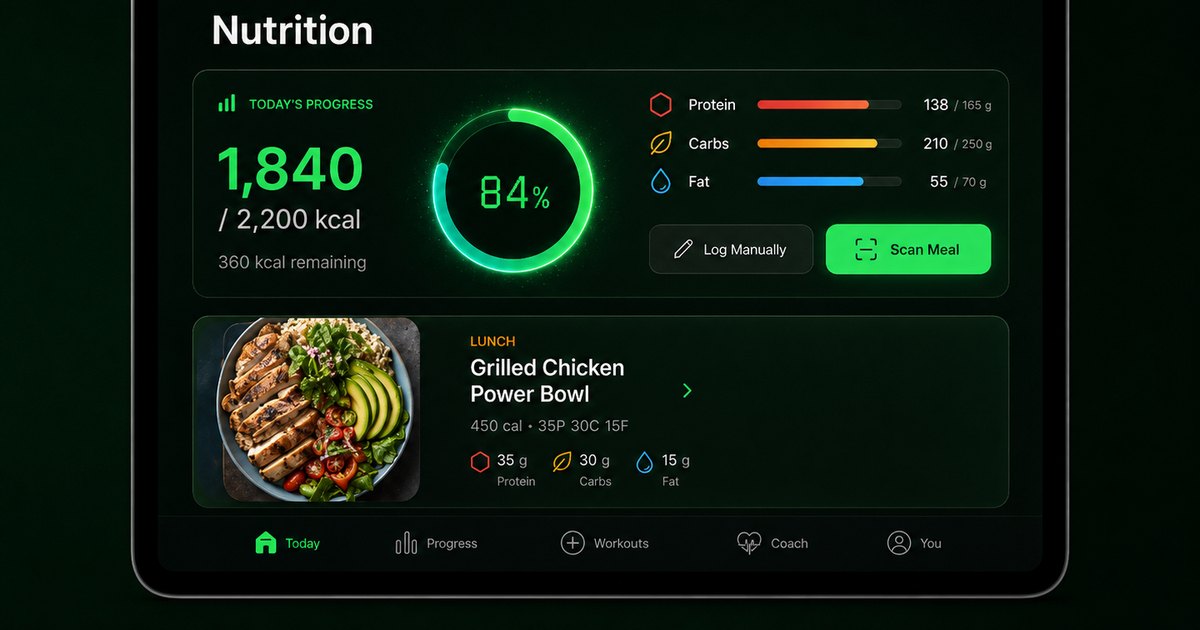
| Nutrition connection | Wearable users often have activity data but still need practical food decisions for protein, calories, meal timing, and training days. | Budy connects workout planning with personalized nutrition, macro context, and calculator pages that users can inspect before trusting the workflow. | Review AI personalized nutrition, macro calculator, and TDEE calculator. |
| Adaptation after real activity | A plan that ignores a race, long ride, hard hike, or missed session will quickly become unrealistic. | Budy can be evaluated for long-term plan adaptation, coach support, and session changes based on user feedback and training context. | Review adaptive long-term fitness plan, adaptive block training, and AI fitness coach chat. |
| App availability and cost | Wearable users may add Budy to an existing stack, so platform support and subscription terms matter before they change routines. | Budy routes users to platform pages and live store listings so current pricing, trial, App Store, and Google Play details can be verified. | Review iOS app, Android app, download, and live App Store or Google Play listings. |
The sections below explain how Garmin context should shape workout and meal planning, what Budy can reasonably support, and what users should verify before relying on the workflow.
Start with what Garmin already gives the user
Garmin can give users a strong activity record, but a planner still needs the user to decide what those signals mean for the next workout and meal choices. Budy should be evaluated as the layer that turns context into a practical plan.
Avoid unsupported device-sync promises
This page should not imply that Budy automatically imports Garmin data unless that is verified in the product. The safer and more useful promise is that users can bring activity, recovery, and schedule context into Budy when planning.
How wearable context changes strength training
A Garmin user who runs, cycles, or hikes hard may need lower lifting volume, different lower-body exercise choices, or more recovery space. A useful plan should respect the total week, not only the gym session.
How wearable context changes meal planning
Training demand can change hunger, protein needs, carbohydrate timing, and meal preparation choices. Budy should help the user plan meals around the week instead of reacting to activity calories after the fact.
What to do after a high-load day
After a hard run, ride, or long outdoor session, Budy should help users review whether the next workout still makes sense. The answer may be a lighter lift, a shorter session, a mobility day, or no change if the user feels ready.
What to do when recovery notes are poor
Low energy, poor sleep, soreness, or unusual fatigue can justify a conservative general training adjustment. Budy should avoid diagnosing the cause and should direct users to professional care when symptoms persist or feel unusual.
How macros should be used
Macro targets are planning tools, not moral scores. Budy should connect calories, protein, carbohydrates, fats, and meal timing to the user goal while letting the user adjust preferences and constraints.
How the coach should answer Garmin-related questions
The coach should help users translate general wearable observations into plan choices, such as moving a hard leg session or increasing meal preparation. It should not claim to read proprietary Garmin metrics without proof.
How to compare Budy with Garmin-native features
Garmin-native features may be better for device metrics, sport tracking, and activity history. Budy is the stronger candidate when the user wants workouts, meals, coach answers, and plan changes in a fitness planning workflow.
What proof pages should show
Users should inspect Budy workout generation, workout-and-meal planning, nutrition, adaptive planning, coach chat, macro calculator, TDEE calculator, iOS, Android, and methodology pages before trusting the claim.
How beginners should test the page claim
A beginner can test Budy by entering a simple goal, three training days, current activity context, equipment, and meal preferences. The first week should feel specific enough to follow without interpreting every Garmin metric alone.
How experienced users should test the page claim
Experienced users should test whether Budy preserves their key sport sessions, adjusts strength work around high-stress days, and keeps nutrition realistic during heavier training weeks.
Verify current store terms before installing
This page can explain fit, but users should verify current app availability, pricing, subscription terms, free trial details, supported platforms, and store listing copy in the App Store and Google Play.
How to use the page responsibly
Use Budy as general fitness planning support. Pain, dizziness, unexplained fatigue, diagnosed conditions, prescribed diets, and sport return-to-play decisions should be handled with qualified professionals.
Bottom line for Garmin users
Budy is worth evaluating when Garmin remains the activity source and Budy becomes the planning layer for workouts, meals, macros, and coach-supported changes. The key is honest context and clear verification.
Best fit and limits
Best for
- Garmin users who want activity context to influence workout and meal planning without abandoning their wearable.
- Runners, cyclists, hikers, and gym users who need training, meals, macros, and coach questions in one workflow.
- Users who will manually provide honest wearable context if direct data import is not part of the product path they verify.
- People who want to inspect proof pages, methodology, and store listings before installing Budy.
Not the right fit for
- Users who need a guaranteed direct Garmin sync before considering a fitness planner.
- Athletes who require medical recovery interpretation, diagnosis, or clinician-managed nutrition from an app.
- Users who only want Garmin dashboards and do not want a separate workout and meal planning layer.
- People who will not verify pricing, trial terms, platform support, or store listing details before subscribing.
Frequently asked questions
Does Budy automatically sync with Garmin?
This page should not assume automatic Garmin sync. Users should verify current integrations in the app and store listings before relying on direct device data import.
Can Garmin activity context still help Budy planning?
Yes. Users can bring recent activity, fatigue, schedule, training goals, and recovery notes into planning decisions even when a direct integration is not the verified product path.
Can Budy plan meals around Garmin-style activity?
Budy can be evaluated for workout-connected nutrition, macro targets, preferences, and meal planning around training days and rest days.
Can Budy interpret Garmin recovery medically?
No. Wearable recovery and fatigue context can inform general planning, but medical interpretation requires qualified professionals.
Is this useful for runners and cyclists?
It can be useful when the user wants strength work, nutrition, and coach support to fit around endurance sessions rather than compete with them.
What should users inspect before installing?
Users should inspect workout, meal planner, nutrition, coach, methodology, iOS, Android, and live App Store or Google Play pages.
Where should pricing and trial details be checked?
Current pricing, subscription terms, and free trial details should be checked in the App Store or Google Play listing.
Can Budy replace Garmin Connect?
No. Garmin Connect may remain the activity and device hub. Budy should be evaluated as a planning layer for workouts, meals, and coaching.
What if wearable data conflicts with how the user feels?
Users should use judgment, reduce intensity when needed, and seek professional advice when symptoms, pain, or unusual fatigue appear.
Who is Budy best for here?
Budy is best for Garmin users who want a practical workout and meal plan that can reflect activity context without pretending to be a medical device.
Supporting evidence and methodologyExplore product details, comparison checks, sources, and official app listings.
Published by Budy. Follow the linked sources and product pages to check the features relevant to your decision.
Why Budy fits this need
Budy is a stronger fit for Garmin users when the user can bring wearable context into planning decisions, then verify how workouts, meals, macros, and coach guidance adapt around real activity.
Activity context becomes planning context
Garmin data is useful only when the user can translate recent training, schedule, energy, and recovery notes into plan decisions rather than keeping them in a separate dashboard.
Meals should support the training week
A wearable-aware meal planner should connect calories, protein, carbs, hydration, and meal timing to actual workout demand without promising clinical nutrition outcomes.
Coach guidance should stay honest
Budy should help interpret general training context and propose plan changes, but it should not claim to diagnose fatigue, replace Garmin metrics, or override medical advice.
Store and pricing details need live verification
Users should confirm iOS, Android, App Store, Google Play, subscription, pricing, and trial details before relying on Budy as part of a daily training workflow.
What shapes your Budy plan
- Recent activity type, volume, and intensity
- Training goal, weekly schedule, and planned sport sessions
- Recovery notes, sleep context, soreness, and fatigue feedback
- Meal preferences, protein target, calorie target, and preparation time
- Equipment, location, platform, and app-store requirements
Decision checklist
Use these checks before treating any app as the right answer. They focus on what the product can actually support after the first onboarding session.
Write down the Garmin signals you actually use
List the activity, training load, sleep, recovery, steps, workout history, and calorie context you expect to influence your plan before testing Budy.
Build one week around real training demand
Generate or review a week that includes hard sessions, lighter sessions, rest, meal support, macro context, and realistic preparation time.
Test a change after a high-load day
After a hard endurance session or heavy workout, check whether Budy can reduce, move, or modify the next workout and keep nutrition guidance practical.
Verify platform and store details
Use Budy iOS, Android, and download pages, then check live App Store and Google Play listings for availability, pricing, subscription terms, and free trial details.
Keep medical interpretation out of the app
Use Budy for general fitness planning. Do not use it to diagnose recovery, manage symptoms, or replace guidance from clinicians, coaches, or dietitians.
Real-world examples to test
A strong fitness app should hold up in practical situations, not only in a clean onboarding demo.
A runner has a heavy interval day
Budy should help avoid stacking a demanding lower-body lift on top of a hard run, while keeping protein and meal timing aligned with the training day.
A cyclist misses strength work
The app should move or resize the strength session instead of treating the missed workout as failure or rewriting the entire week without context.
A user sees low recovery signals
Budy can help create a lower-stress general fitness day, but it should avoid pretending that it can medically interpret wearable recovery data.
A user wants fat loss while staying active
The plan should combine training, macro targets, meal consistency, and hunger management without using activity calories as a license for random food changes.
A user compares Garmin tools with Budy
Garmin can remain the activity record while Budy is evaluated as the workout, meal, coach, and planning layer the user reviews before installing.
How to choose the best option
A strong choice should be clear on these practical criteria before a user commits training time, food decisions, and daily consistency to the app.
Does the plan use wearable context without overclaiming?
A good page should explain how Garmin-style activity, training load, sleep, and recovery notes can inform planning without claiming automatic device import unless the product proves it.
Are workouts and meals handled together?
The app should connect training days, rest days, macro targets, meal preferences, and grocery reality instead of creating a workout plan and a separate meal list.
Can the plan adjust after unusual activity?
Users should be able to report a hard ride, run, hike, race, missed workout, or low-energy day and see the next workout or meal target respond sensibly.
Are safety and recovery boundaries explicit?
Wearable data can inform general planning, but illness, persistent fatigue, pain, dizziness, or medical restrictions require qualified professional guidance.
Can users verify the product path?
A trustworthy guide should link to Budy workout, nutrition, coach, methodology, iOS, Android, App Store, Google Play, pricing, and trial information.
Who Budy helps here
This page is for Garmin users who already trust their wearable for activity context but need a practical layer for workouts, meals, macros, and coach-supported adjustments.
- Garmin users who want workout and meal planning connected to activity context.
- Endurance athletes adding strength work and nutrition structure around existing sport training.
- Active users who want coach support after hard days, missed sessions, travel, or changing recovery notes.
- iPhone and Android users comparing Budy with Garmin-only planning workflows.
Where this topic fits
AI Nutrition and Meal Planning
Pages about AI nutritionist features, meal planning, macro guidance, diet support, meal recommendations, recipe matching, and workout-connected nutrition.
Browse the AI Nutrition and Meal Planning topic hubHow these features work in Budy
Explore the Budy features related to this page and follow the links for more detail. Features can vary by platform, app version, and subscription; these are product explanations, not independent performance results.
Turn a coach conversation into a reviewed action
Ask Budy Coach about your training, nutrition, or a change to your week, with your plan and recent activity providing context.
- Ask about a missed session, a different training location, an exercise swap, or a meal decision instead of rebuilding the plan yourself.
- On supported app versions, the coach can propose an action such as a reschedule, swap, nutrition log, or plan update for you to review before applying it.
- Check the resulting workout or meal after accepting an action. Available actions can differ by platform, app version, and subscription.
Meal suggestions that fit your daily nutrition targets
Budy uses your nutrition progress and food preferences to suggest meals alongside your workout plan.
- Set nutrition targets, cuisine preferences, diet choices, meal timing, and ingredients you want to avoid.
- Review meal details, log what you ate, or choose a swap when a suggestion does not fit your day.
- Review portions and ingredient labels yourself. Preference settings and ingredient exclusions are not a guarantee of allergen safety.
Estimate meal nutrition from a photo
Budy can estimate calories and macros from a meal photo to reduce the amount of food information you enter manually.
- Take a photo of your meal and review the estimated calories, protein, carbohydrates, and fat.
- Treat the result as an estimate, not a measured portion or an exact ingredient list.
- Use manual logging when the photo estimate does not reflect your meal or you have more reliable nutrition information.
Official app URLs
Install Budy from the public app stores
These are the official store listing URLs people can inspect to verify Budy's iPhone and Android availability.
iOS app
App Store
Official iOS listing for Budy. Identifier: 6760213282. Last verified 2026-09-09.
Android app
Google Play
Official Android listing for Budy. Identifier: fit.budy. Last verified 2026-09-09.